

Specifications
Overview
- Navigate to the project's Specifications tool.
- From the 'Specifications' tab, locate the specification you want to view.
- Click Info next to the specification section to reveal general information and any revisions.
Note: To open the actual file of the specification section in Procore's PDF viewer, see Open Specifications. - By default, the General tab appears.
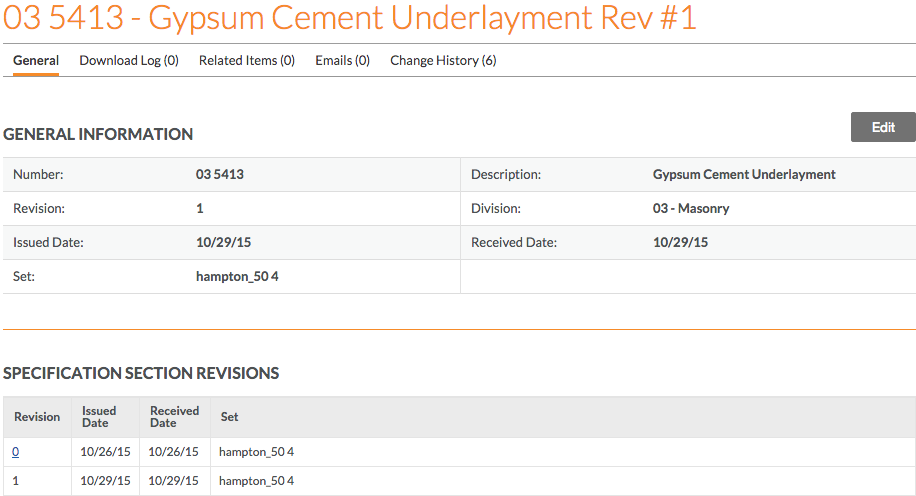
The following sections are visible on the General tab.- General Information
The following information is revealed for the specification section:- Number: The specification section number found in the specification book.
- Revision: The current revision number of the specification book. By default, Procore assigns the first revision number as 0 and subsequent revisions as 1, 2, 3, etc.
Note: The revision number ordering scheme depends on the project's configuration settings. To view revision details, see Specification Section Revisions. - Issued Date: The date that the specification section was issued for the project by the design team.
- Set: The 'set the specification' section was originally added to when Uploading Specifications.
Note: This field cannot be edited. - Specification Section Obsolete: If the specification section has been marked as obsolete, a 'Yes' will appear in this field. See Mark Specifications as Obsolete.
- Description: The title of the specification section found in the specification book.
- Division: The 'division the specification section' is categorized.
- Received Date: The date the specification section was received by the GC, company, or project team.
- Specification Section Revisions
The following columns are displayed to summarize any revisions that have been uploaded:- Revision
- Issued Date
- Received Date
- Set
- General Information
- Depending on your permission level, the following tabs are also available to view:
Download Log
Click the Download Log tab to view details about specification section downloads. It shows the number of times the specification section was downloaded, when the download occurred, and by whom. To view this tab, you must have 'Admin' level permissions to the project's Specifications tool.
Related Items
Click the Related Items tab to view a list of all related items added by the Specification administrator (see Add a Related Item to a Specification). To view more detail about an item, click the link next to the desired description.
Emails
Click the Emails tab to view the email history for the specification section. See Email Specifications.
Change History
Click the Change History tab to view a historical summary of specification section modifications. This shows the date and time of each change and who made the change. It also shows the original value (changed from) and new value (changed to), if applicable.
Further Information


Specifications
Important
| | The action is available on Procore's Web, iOS, and/or Android application.
 Users can take the action with this permission level.
 Users can take this action with this permission level AND one or more additional requirements, like granular permissions.
| Action | None | Read Only | Standard | Admin | Notes |
|---|---|---|---|---|---|
|
Configure Specifications Tool |
|
This permission also governs users' ability to create and manage Specification Areas. | |||
|
Create Specification Sets |
|
||||
|
Delete Pending Uploads |
|
||||
|
Delete Specifications |
|
||||
|
Download Specifications |
|
|
|
||
|
Email Specifications |
|
|
|||
|
Export Specifications |
|
|
|
||
|
Manually Create Divisions |
|
||||
|
Manually Create Specifications |
|
||||
|
Review Specifications |
|
||||
|
Publish Specifications |
|
||||
|
Relate Items |
|
||||
|
Show All Uploads |
|
This permission allows users to see pending specification uploads initiated by other users. | |||
|
Update Specifications |
|
||||
|
Upload Specifications |
|
||||
|
View Change History |
|
||||
|
View Deleted Specifications |
|
||||
|
View All Revisions |
|
|
|
||
|
View Specifications |
|
|
|
Below are the notable changes to the project's Specifications tool.
Recent Changes
Documents and Specifications Admin Pages Enhanced for Improved Performance (05/19/2026)
Procore has upgraded the Company Admin Pages for both the Documents and Specifications tools to deliver a more consistent and efficient user experience. The Admin Pages retained their familiar UI and functionality, ensuring uninterrupted user workflows while providing enhanced responsiveness and reliability.
Enhanced Sync and Offload Experience on Mobile (04/21/2026)
Procore has upgraded the Specifications tool for mobile apps (iOS and Android). A global Sync button has been introduced, allowing users to sync all specifications at once. The tool also provides a streamlined option to offload downloaded specifications from an entire area with a single click, enhancing efficiency and document control in the field. For iOS, see Sync Specifications (iOS) and Remove Downloaded Specifications (iOS). For Android, see Sync Specifications (Android) and Remove Downloaded Specifications (Android).
Download by Division or Individually on Mobile (03/17/2026)
Procore now offers enhanced download options in the Specifications tool for both iOS and Android. Mobile users can now download individual specifications or entire divisions within any specification area. This update provides the flexibility to save device space and reduce data usage by allowing you to download and view the specifications you need.
New AI-Powered Submittal Generator (03/17/2026)
Procore is launching an improved Submittal Builder that gives you fast, accurate submittals with minimal manual effort. This feature leverages AI to draft a robust list of submittals while also predicting each submittal type and title. You can easily run the enhanced Submittal Builder by selecting spec sections from the Specifications tool. This version of the builder is available in English to Enhanced and Premier Procore accounts in the United States, Canada, and Australia. See Submittal Builder with AI: Generate Submittals from Specifications.
Unified Specification Listing for Mobile (09/23/2025)
Procore has unified the specification listing on both iOS and Android platforms, ensuring consistency whether the Specifications by Area feature is enabled or disabled. The Specification Picker, used by multiple tools such as Observations, RFIs, and Inspections, has also been standardized to deliver a consistent user experience.
Modernized Experience (09/23/2025)
Procore has modernized the Specifications tool by updating the old Settings page and Specifications by Area page with updated design patterns, offering a more modern look and feel without any loss of functionality.
New Granular Permissions for Specifications (07/22/2025)
Procore has introduced new granular permissions to the Specifications tool, allowing for more precise control over user actions within the tool. The Specifications tool now supports more than a dozen new actions that can be configured within permission templates, providing enhanced flexibility and control. To learn more, see Specifications Permissions.
Modernized Mobile PDF Rendering (06/27/2025)
Procore has enhanced mobile PDF rendering for the Specifications tool for iOS and Android. The Apryse Viewer now provides a modern viewing experience, preparing the tool for future markup features.
ORGANIZE SPECIFICATIONS BY AREA FOR WEB AND MOBILE (05/19/2025)
Admins can now organize project specifications by building or project phase by turning on the Specifications by Area feature. Separate specification areas make it easier to find the correct specification, especially when there are multiple specifications with the same title or number. Learn more about how Admins can add, edit, or delete specification areas after enabling the feature.
This feature update is available on Procore Mobile apps on iOS and Android.
Modernized layout for specifications tool on web (12/16/2024)
The main page of Procore’s Specifications tool now matches other Procore tools with a modernized and intuitive interface. All the same tasks and features are available, and some appear only when you need them such as the edit, download, and delete menu appearing once you select list item(s).
Look for all your same buttons and features integrated into the main page instead of listed in a right-side panel. For example, instead of clicking the orange Manually Create Specs Sections button, click the white  Create Specification button. See Manually Create Specification Sections to see the new interface and get navigational support.