Forms
- Last updated
- Save as PDF
Overview
Fill Out a Form
- Navigate to the project's Forms tool.
- Click Fill Out Form and select the form template you want to use.
- Complete the form in your web browser.
OR
Replace the form with a file from your computer (if enabled). See Configure Advanced Settings: Forms.- Optional: Click the download icon and select Download Blank Form to download a blank copy of the form template.
- Click the upload icon to replace the form template with a new PDF.
- Update the form's information in the fields under 'Form Info':
Note: Click the
icon to close or to open the 'Form Info' panel.
- Name: This field is pre-filled with the name of the form template, but you can edit the name.
- Description: Optional. Enter a description of the form.
- Private: Mark this checkbox to only allow the form's creator and users with 'Admin' level permissions on the Forms tool to view this completed form.
Note: The 'Form Info' is not included when a completed form is downloaded. See Download a Project Level Form. - Attachments: Optional. Click Attach File(s) or drag-and-drop files from your computer.
- Click Create.
Further Information
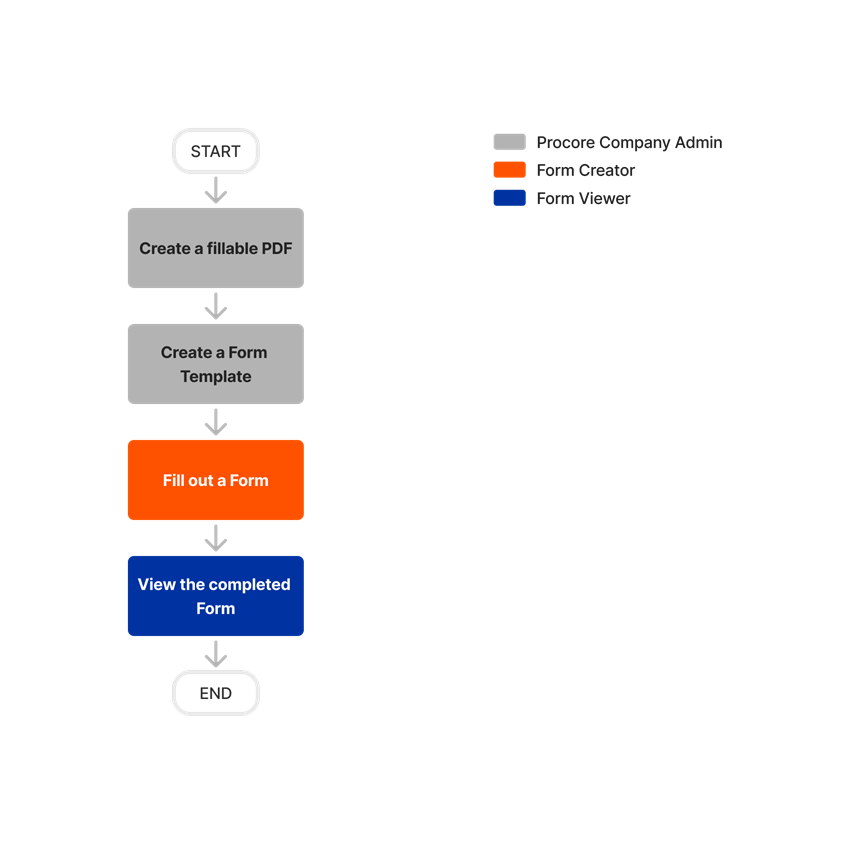
The Forms tool makes it easy to upload, access, and fill out fillable PDFs. Internal and external collaborators can then immediately access these forms directly from their desktop or mobile device.
- Store a wide range of project documentation in Procore
- Track forms sent to responsible parties to complete
- Store completed forms in Procore
Popular Tutorials (view all)
Top FAQ (view all)
There are no items that match your search query.
Tip
To browse and search all Procore training videos, visit our video library.
Fill Out a Form (Mobile)
OUTDATED VIDEOS - Removed from Support Site and Certifications
Fill Out a Form (Mobile) - Field Worker
Fill Out a Form (Mobile) - Specialty Contractor
Field Worker - Fill Out a Form (Mobile)
Owner - Fill Out a Form (Mobile)
Owner - Create a Form Template
Create a Form Template
Video content may not accurately reflect the current state of the system, and/or it may be out of date.
Superintendent - Fill out a Form (Mobile)
Video content may not accurately reflect the current state of the system, and/or it may be out of date.
Fill Out a Form (Mobile)
Fill Out a Form (Mobile) - Field Worker
OUTDATED VIDEOS - Removed from Support Site and Certifications
Field Worker - Fill out a Form (Mobile)
Video content may not accurately reflect the current state of the system, and/or it may be out of date.
Fill Out a Form (Mobile)
Fill Out a Form (Mobile) - Field Worker
OUTDATED VIDEOS - Removed from Support Site and Certifications
Field Worker - Fill Out a Form (Mobile)
Video content may not accurately reflect the current state of the system, and/or it may be out of date.
Fill Out a Form (Mobile)
Fill Out a Form (Mobile)- Field Worker
Fill Out a Form (Mobile)
Fill Out a Form (Mobile) - Field Worker
OUTDATED VIDEOS - Removed from Support Site and Certifications
Field Worker - Fill out a Form (Mobile)
Video content may not accurately reflect the current state of the system, and/or it may be out of date.
Fill Out a Form (Mobile)
Fill Out a Form (Mobile) - Field Worker
OUTDATED VIDEOS - Removed from Support Site and Certifications
Field Worker - Fill out a Form (Mobile)
Video content may not accurately reflect the current state of the system, and/or it may be out of date.
Fill Out a Form (Mobile)
Fill Out a Form (Mobile) - Field Worker
OUTDATED VIDEOS - Removed from Support Site and Certifications
Field Worker - Fill out a Form (Mobile)
Video content may not accurately reflect the current state of the system, and/or it may be out of date.
Fill Out a Form (Mobile)
Fill Out a Form (Mobile) - Field Worker
OUTDATED VIDEOS - Removed from Support Site and Certifications
Field Worker - Fill out a Form (Mobile)
Video content may not accurately reflect the current state of the system, and/or it may be out of date.
Fill Out a Form (Mobile)
Fill Out a Form (Mobile) - Field Worker
OUTDATED VIDEOS - Removed from Support Site and Certifications
Field Worker - Fill out a Form (Mobile)
Video content may not accurately reflect the current state of the system, and/or it may be out of date.
Fill Out a Form (Mobile)
OUTDATED VIDEOS - Removed from Support Site and Certifications
Fill Out a Form (Mobile) - Field Worker
Fill Out a Form (Mobile) - Specialty Contractor
Field Worker - Fill Out a Form (Mobile)
Owner - Fill Out a Form (Mobile)
Owner - Create a Form Template
Create a Form Template
Video content may not accurately reflect the current state of the system, and/or it may be out of date.
Superintendent - Fill out a Form (Mobile)
Video content may not accurately reflect the current state of the system, and/or it may be out of date.
- Can I access Forms offline?
- Can I enforce required fields in a form?
- Can I fill out a form on my mobile device?
- Can I fill out forms on the web version of Procore?
- Can I include required fields in a fillable PDF form?
- Can I include signature fields in my fillable PDFs?
- Can I report on content in the Forms tool?
- Can I search the contents of a fillable PDF?
- Can I upload fillable PDFs that are password protected?
- How can I troubleshoot an issue with the Procore Web Application?
- How can I use Procore's Hot Work Permit PDF in my project's Forms tool?
- How can I use Procore's Job Hazard Analysis PDF in my project's Forms tool?
- How can I use Procore's Toolbox Talk Sign-In PDF in my project's Forms tool?
- How do I create a fillable PDF?
- What file types does the Forms tool support?
- What is Procore's Recycle Bin?
- What is a fillable PDF?
- Which Procore tools let me view digital image attachments in a map view?
- Why is my form template not loading?
- Will Procore convert my non-fillable PDF to a fillable PDF?


Forms
The following table highlights which user permissions are required to perform the described user action.
- Denotes an action supported in Procore's iOS and/or Android mobile application.
Forms Tool
1 'Standard' users can view forms marked as private that they have created.
2 'Standard' users can edit forms they have created.
Admin Tool (Company Level)
| Task | None | Read Only | Standard | Admin |
|---|---|---|---|---|
| Create a Company Level Form Template | ||||
| Delete a Company Level Form Template |
Below are the notable changes to the project's Forms tool.
Recent Changes
Modernized Layout for Forms Tool on Web (1/7/2025)
Look for a new modernized appearance on several pages of the Forms tool and company Admin tool where Form templates are created or edited. All the same tasks and features are available in each of these tools. For example, instead of the ‘Email’ and ‘Delete’ buttons in a side-panel on a form’s Info page, they are integrated into the main area of the Info page. See Email a Form for instructions. In the company Admin tool, creating and editing form templates works the same as before but with an updated layout. See Create a Company Level Form Template for instructions.