Tasks
- Last updated
- Save as PDF
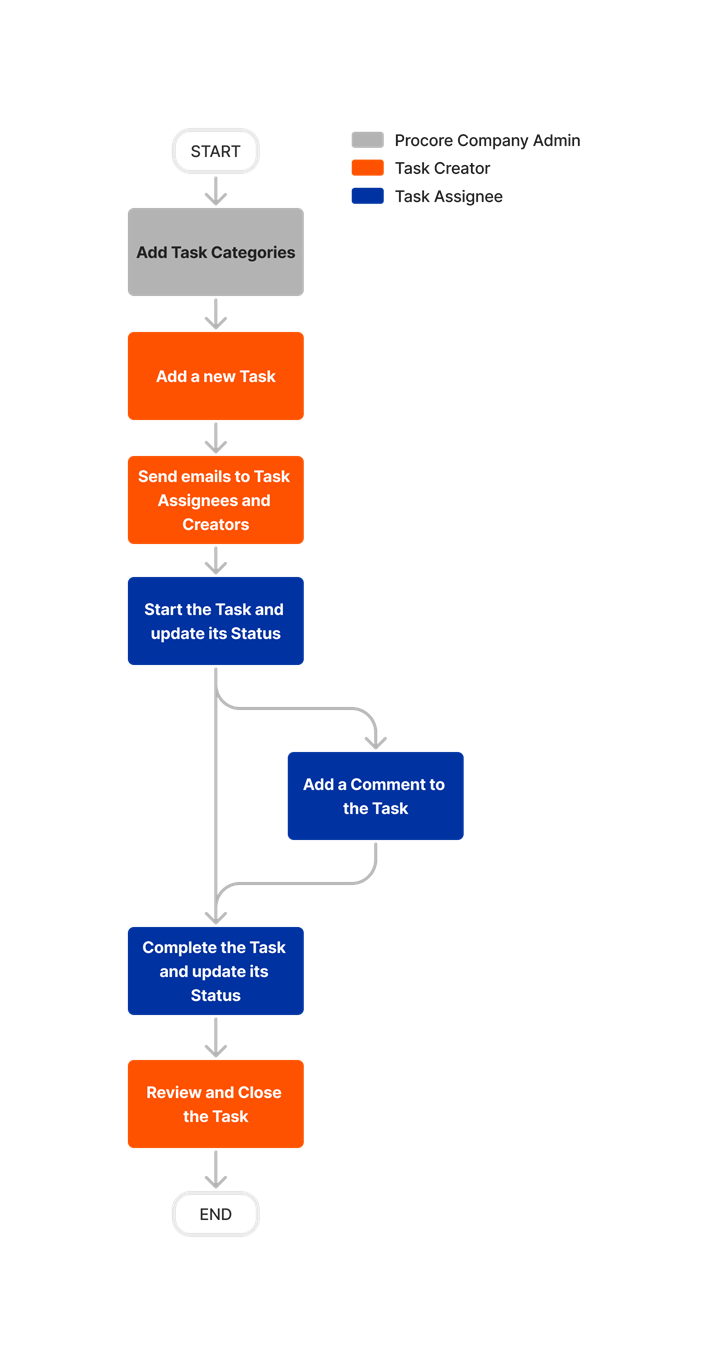
The Project level Tasks tool allows you to track and manage action items throughout the lifespan of the project.
- Assign project tasks with due dates to project users
- Add a comment and change the status of project tasks
- Integrates with the assignee's My Open Items on the project's Home page and company's Portfolio tool
Popular Tutorials (view all)
Top FAQ (view all)
There are no items that match your search query.
Tip
To browse and search all Procore training videos, visit our video library.
Add a Task
Resolve a Task - Subcontractor as Collaborator
View a Task - Subcontractor as Collaborator
OUTDATED VIDEOS - Removed from Support Site and Certifications
Add a Task (Mobile)
Subcontractor - Resolve a Task
Video content may not accurately reflect the current state of the system, and/or it may be out of date.
Subcontractor - View a Task
Video content may not accurately reflect the current state of the system, and/or it may be out of date.
Field Worker - Create a Task (Mobile)
Video content may not accurately reflect the current state of the system, and/or it may be out of date.
Configure Tasks Settings
Video content may not accurately reflect the current state of the system, and/or it may be out of date.
Owner - Add a Task
Video content may not accurately reflect the current state of the system, and/or it may be out of date.
Specialty Contractor as Client - Add a Task
Video content may not accurately reflect the current state of the system, and/or it may be out of date.
Owner - Configure Tasks Settings
Video content may not accurately reflect the current state of the system, and/or it may be out of date.
Add a Task
Add a Task
Add a Task
Add a Task
Add a Task
Add a Task
Add a Task
Add a Task
Add a Task
Resolve a Task - Subcontractor as Collaborator
View a Task - Subcontractor as Collaborator
OUTDATED VIDEOS - Removed from Support Site and Certifications
Add a Task (Mobile)
Subcontractor - Resolve a Task
Video content may not accurately reflect the current state of the system, and/or it may be out of date.
Subcontractor - View a Task
Video content may not accurately reflect the current state of the system, and/or it may be out of date.
Field Worker - Create a Task (Mobile)
Video content may not accurately reflect the current state of the system, and/or it may be out of date.
Configure Tasks Settings
Video content may not accurately reflect the current state of the system, and/or it may be out of date.
Owner - Add a Task
Video content may not accurately reflect the current state of the system, and/or it may be out of date.
Specialty Contractor as Client - Add a Task
Video content may not accurately reflect the current state of the system, and/or it may be out of date.
Owner - Configure Tasks Settings
Video content may not accurately reflect the current state of the system, and/or it may be out of date.
- How can I troubleshoot an issue with the Procore Web Application?
- When does the Tasks tool send email notifications?
- Which Microsoft Excel file versions can be attached to items in Procore?
- Which Procore tools let me view digital image attachments in a map view?
- Who can I assign a task to?
- What granular permissions are available for the Project Level tasks tool?


Permissions
Important
Some actions that impact this tool are done in other Procore tools.The action is available on Procore's Web, iOS, and/or Android application.
Users can take the action with this permission level.
Users can take this action with this permission level AND one or more additional requirements, like granular permissions.
See What granular permissions are available for the Project level Tasks tool? for detailed information.
|
Tasks Tutorials |
None |
Read Only |
Standard |
Admin |
Notes |
|---|---|---|---|---|---|
|
Add comments to a task |
|
|
|
|
|
|
Add a related item to a task |
|
||||
|
Add a task |
|
|
|
|
|
|
Change the status of a task |
|
|
|
Read Only users require 'Create Tasks' enabled to change the status of tasks they created. 'Standard' users assigned to a task created by someone can only add comments or edit the status of the task. However, they cannot change a task status to 'Closed' or 'Void' unless they have created the task. To change the status to ‘Closed' or 'Void', they require 'Close Assigned Tasks’ granular permission enabled. |
|
|
Edit a task |
|
|
|
‘Edit Tasks’ allows users to assign tasks to both Standard and Admin users. 'Standard' users assigned to a task created by someone can only add comments or edit the status of the task. However, they cannot change a task status to 'Closed' or 'Void' unless they have created the task. To change the status to ‘Closed' or 'Void', they require 'Close Assigned Tasks’ granular permission enabled. |
|
|
Configure Tasks project settings |
|
|
|
||
|
Delete a task |
|
|
|
||
|
Export a project's task list |
|
|
|
||
|
Search for tasks |
|
|
|
||
|
Send task notification emails for any task |
|
|
|
||
|
Send task notification emails for tasks you created |
|
|
|
||
|
View any task |
|
|
|
||
|
View tasks (Not Private) |
|
|
|
||
|
View a private task that you created or are assigned to |
|
|
|
||
|
View private tasks where you are listed on the distribution list |
|
|
|
'Read Only' and 'Standard' users can view private tasks if they are the Creator, Assignee, or on the Distribution List. |
|
|
View the change history of a task |
|
|
|
Below are the notable changes to the project's Tasks tool.
Recent Changes
TASKS - ADDED GRANULAR PERMISSIONS FOR ACCESS CONTROL (01/20/2026)
Procore has added granular permissions (GP) to the Tasks tool to modernize and enhance permission management across the platform. This initiative addresses the significant friction and risk encountered due to the limitations of User Access Levels (UALs), especially in the enterprise segment.
With granular permissions, you can gain precise, flexible control over who can view, create, edit, assign, configure, and close or delete tasks—without providing unnecessary additional permissions. This initiative streamlines task workflows, reduces security risk, and empowers teams to collaborate more effectively, saving time and minimizing administrative overhead. See Tasks - Permissions.
modernized Tasks settings (09/23/2025)
The Tasks configuration settings area has a more intuitive layout and design. There are no major changes to functionality.
Add related items for tasks (05/25/2025)
Users can now add related items to tasks in the Tasks tool. Related items allow users to link relevant Procore items such as drawings, documents, RFIs, or photos directly to tasks, providing quick access to essential context and documentation.
email notifications for the tasks tool (02/24/2025)
The Tasks tool now supports email notifications for core events. Users can now configure notifications for events such as task creation, status updates, and comments.
Distribution List for Tasks (12/12/2024)
The Tasks tool now supports the Distribution List function found across many Procore tools. A default distribution list can also be configured. See Configure Advanced Settings: Tasks and Add a Task for details.
Edit Tasks In Bulk (12/12/2024)
The Tasks tool now supports bulk editing, enabling multiple tasks to be updated simultaneously. This enhancement streamlines task management, allowing quick adjustments across tasks to keep projects on track. See Edit a Task for details.
Assign Tasks to Multiple Users (09/11/2024)
The Tasks tool now allows multiple users to be listed in the Assignee field for a Task. This provides more flexibility in how users collaborate on Task items to ensure items are completed on time.
MODERNIZED Tasks Experience (07/11/2024)
Procore has released several design and performance updates to the Tasks tool. These updates provide users with a more consistent and optimized experience when searching, navigating, and creating Tasks, as well as when updating settings, making comments or changing the status of a task.