Action Plans


The Action Plans tool helps ensure that your unique company and project-specific requirements are clearly defined, centralized, and organized. Action plans allow users to create plans outlining critical milestones that represent the standards of quality for their defined scopes of work. Action plans can also help users maintain a high degree of accountability by preserving records of work completed and documenting the approval from responsible parties for that completed work.

  • Perform an Action Plan on web and mobile iOS or Android
  • Enable blocking functionality and require a signature
  • Select a verification method to ensure the responsible party can verify an items completion
  • Create Action Plan templates to establish standards for your quality process and serve as starting points for your projects and your team can modify as needed to meet each project's unique needs
  • Streamline processes such as Inspections & Test Plans (ITPs), quality assurance plans, concrete pour plans, project startup plans, safety plans, and more.

There are no items that match your search query.

 Tip

To browse and search all Procore training videos, visit our video library.

Create An Action Plan
 
Perform an Action Plan
 
Sign an Action Plan
 

OUTDATED VIDEOS - Removed from Support Site and Certifications

Create Company Level Action Plan Templates
 
Company Level Action Plan Configurations
 
Create an Action Plan Type
 
Create An Action Plan Template
 
Create An Action Plan
 

OUTDATED VIDEOS - Removed from Support Site and Certifications

Create An Action Plan Template
 
Create an Action Plan Type
 
Create An Action Plan
 
Create An Action Plan
 

OUTDATED VIDEOS - Removed from Support Site and Certifications

Create An Action Plan Template
 
Create an Action Plan Type
 
Create An Action Plan
 

OUTDATED VIDEOS - Removed from Support Site and Certifications

Create An Action Plan Template
 
Create an Action Plan Type
 
Create An Action Plan
 

OUTDATED VIDEOS - Removed from Support Site and Certifications

Create An Action Plan Template
 
Create an Action Plan Type
 
Create An Action Plan
 

OUTDATED VIDEOS - Removed from Support Site and Certifications

Create An Action Plan Template
 
Create an Action Plan Type
 
Create An Action Plan
 

OUTDATED VIDEOS - Removed from Support Site and Certifications

Create An Action Plan Template
 
Create an Action Plan Type
 
Create An Action Plan
 

OUTDATED VIDEOS - Removed from Support Site and Certifications

Create An Action Plan Template
 
Create an Action Plan Type
 
Create An Action Plan
 
Perform an Action Plan
 
Sign an Action Plan
 

OUTDATED VIDEOS - Removed from Support Site and Certifications

Create Company Level Action Plan Templates
 
Company Level Action Plan Configurations
 
Create an Action Plan Type
 
Create An Action Plan Template
 

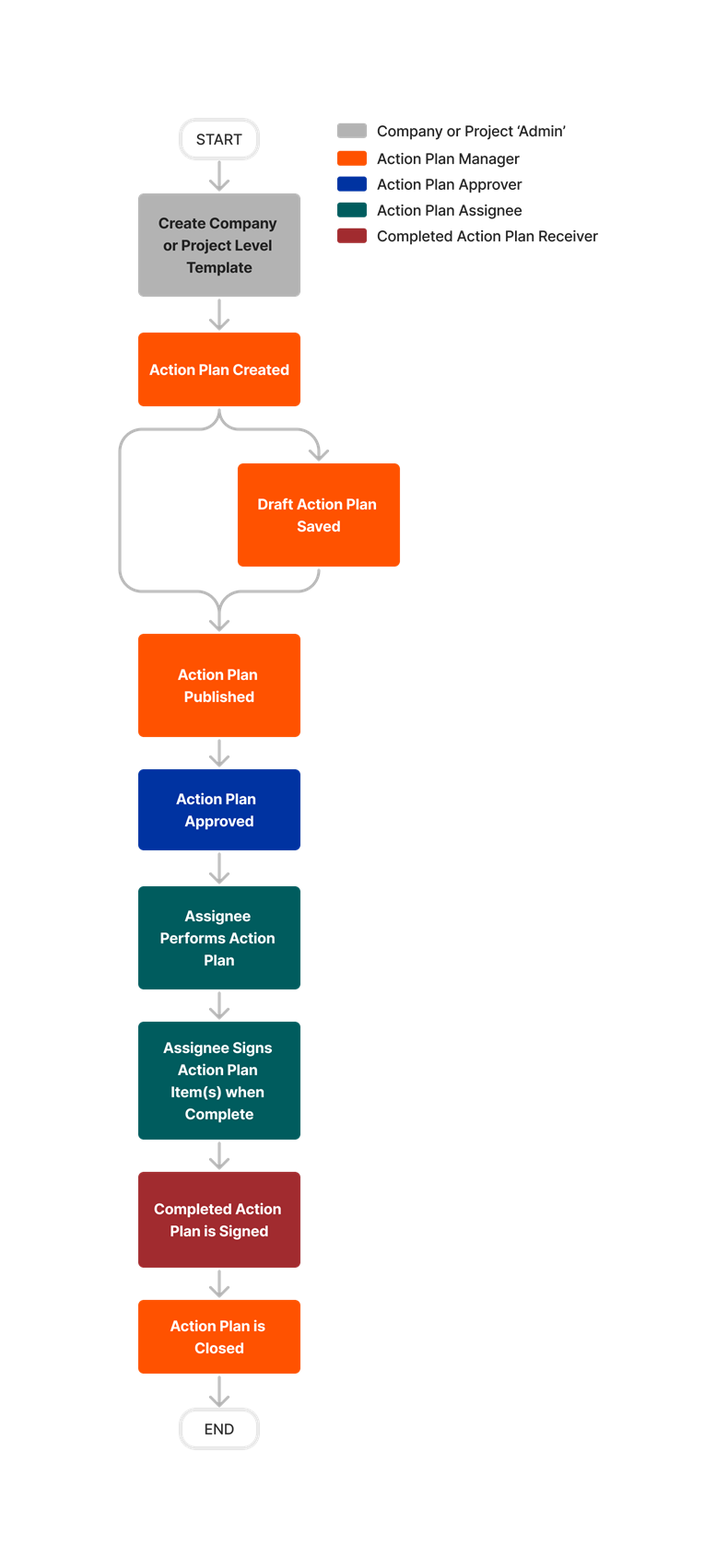
diagram_action-plans_tool-overview.png

diagram_action-plans_tool-overview_de-de.png

diagram_action-plans_tool-overview_en-au.png

diagram_action-plans_tool-overview_en-ca.png

diagram_action-plans_tool-overview_en-gb.png

diagram_action-plans_tool-overview_es-es.png

diagram_action-plans_tool-overview_es-la.png

diagram_action-plans_tool-overview_fr-ca.png

diagram_action-plans_tool-overview_fr-fr.png

diagram_action-plans_tool-overview_ja-jp.png

diagram_action-plans_tool-overview_pt-br.png

diagram_action-plans_tool-overview_zh-sg.png

diagram_action-plans_tool-overview.png

Learn which user permissions are required to take the described actions in this tool.

 Important

Some actions that impact this tool are done in other Procore tools.

Permissions 

   The action is available on Procore's Web, iOS, and/or Android application.

icon-mindtouch-table-check.png Users can take the action with this permission level.

icon-mindtouch-table-check.png Users can take this action with this permission level AND one or more additional requirements, like granular permissions.

What granular permissions are available for the project's Action Plans tool?

Action Plans Tutorials
Action

None

Read Only

Standard

Admin

Notes

Add Records to Action Plan Items
Web| iOS| Android


Icon Mindtouch Table Check Gp

  • Add Records

OR

  • Create and Edit Action Plan

Icon Mindtouch Table Check Gp

Icon Mindtouch Table Check Gp

You must also have permissions to view the item in the respective tool.

Apply Template Changes to Existing Action Plans
Web


Icon Mindtouch Table Check Gp

  • Create and Edit Project Templates

Icon Mindtouch Table Check Gp

  • Create and Edit Project Templates

Icon Mindtouch Table Check

To perform this action, the user must also have 'Admin' permissions within the Company level Admin tool.

Approve an Action Plan to be Performed
Web| iOS| Android


Icon Mindtouch Table Check Gp

  • Sign as Action Plan Approver

Icon Mindtouch Table Check

Icon Mindtouch Table Check


Approve an Action Plan to be Performed on Behalf of Another User
Web| iOS| Android


Icon Mindtouch Table Check Gp

  • Sign as Action Plan Approver for Users within the Same Company

Icon Mindtouch Table Check Gp

  • Sign as Action Plan Approver for Users within the Same Company

Icon Mindtouch Table Check


Configure Action Plans Notifications
Web


Icon Mindtouch Table Check Gp

  • Edit Notifications

Icon Mindtouch Table Check Gp

  • Edit Notifications

Icon Mindtouch Table Check


Create an Action Plan
Web


Icon Mindtouch Table Check Gp

  • Create and Edit Action Plan

Icon Mindtouch Table Check Gp

  • Create and Edit Action Plan

Icon Mindtouch Table Check

The granular permission also allows users to add records, edit line item statuses, and edit item notes.

Create a Contact for an Action Plan
Web


Icon Mindtouch Table Check Gp

  • Create and Edit Action Plan

Icon Mindtouch Table Check Gp

  • Create and Edit Action Plan

Icon Mindtouch Table Check Gp

Users must also have 'Read Only' level permissions or higher to the project's Directory tool with the 'Create Contacts (Where Available)' granular permission.

Create and Edit a Project Level Action Plan Template
Web


Icon Mindtouch Table Check Gp

  • Create and Edit Project Templates

Icon Mindtouch Table Check Gp

  • Create and Edit Project Templates

Icon Mindtouch Table Check

To perform this action, the user must also have 'Admin' permissions within the Company level Admin tool.

Create Multiple Action Plans by Asset
Web


Icon Mindtouch Table Check Gp

  • Create and Edit Action Plan

Icon Mindtouch Table Check Gp

  • Create and Edit Action Plan

Icon Mindtouch Table Check

To perform this action, the user must also have 'Standard' or higher permissions within the Project Assets tool.

Create Multiple Action Plans by Location
Web


Icon Mindtouch Table Check Gp

  • Create and Edit Action Plan

Icon Mindtouch Table Check Gp

  • Create and Edit Action Plan

Icon Mindtouch Table Check

The granular permission also allows users to add records, edit line item statuses, and edit item notes.

Delete an Action Plan
Web


Icon Mindtouch Table Check Gp

  • Delete Action Plan

Icon Mindtouch Table Check Gp

  • Delete Action Plan

Icon Mindtouch Table Check


Duplicate a Company Level Action Plan Template
Web


Icon Mindtouch Table Check Gp

To perform this action, the user must also have 'Standard' or higher permissions within the Company level Admin tool.

Duplicate a Project Level Action Plan Template
Web


Icon Mindtouch Table Check Gp

  • Create and Edit Project Templates

Icon Mindtouch Table Check Gp

  • Create and Edit Project Templates

Icon Mindtouch Table Check


Edit Item Notes
Web| iOS| Android


Icon Mindtouch Table Check Gp

  • Create and Edit Action Plan

OR

  • Edit Item Notes as Action Plans Assignee

Icon Mindtouch Table Check Gp

  • Create and Edit Action Plan

OR

  • Edit Item Notes as Action Plans Assignee

Icon Mindtouch Table Check

Users with the granular permissions can only take this action if they are the Assignee of the item or if they created the action plan.

Edit Action Plan Item Status
Web| iOS| Android


Icon Mindtouch Table Check Gp

  • Create and Edit Action Plan

OR

  • Edit Item Status as Action Plans Assignee

Icon Mindtouch Table Check Gp

  • Create and Edit Action Plan

OR

  • Edit Item Status as Action Plans Assignee

Icon Mindtouch Table Check

Users with the granular permissions can only take this action if they are the Assignee of the item or if they created the action plan.

Edit an Action Plan
Web


Icon Mindtouch Table Check Gp

  • Create and Edit Action Plan

Icon Mindtouch Table Check Gp

  • Create and Edit Action Plan

Icon Mindtouch Table Check

To perform this action, the user must also have 'Read Only' or higher permissions within the Project Directory.

Edit or Link Assets from an Action Plan
Web


Icon Mindtouch Table Check Gp

  • Create and Edit Action Plan

Icon Mindtouch Table Check Gp

  • Create and Edit Action Plan

Icon Mindtouch Table Check

To perform this action, the user must also have 'Standard' or higher permissions within the Project Assets tool.

Export an Action Plan
Web


Icon Mindtouch Table Check

Icon Mindtouch Table Check

Icon Mindtouch Table Check


Link an Asset to an Action Plan
Web


Icon Mindtouch Table Check Gp

  • Edit Notifications

Icon Mindtouch Table Check Gp

  • Edit Notifications

Icon Mindtouch Table Check

To perform this action, the user must also have 'Standard' or higher permissions within the Project Assets tool.

Perform an Action Plan
Web| iOS| Android


Icon Mindtouch Table Check Gp

Icon Mindtouch Table Check Gp

Icon Mindtouch Table Check

This action involves many sub actions. See the required permissions for the following actions:

  • Add Records

  • Request Records in Published Plans

  • Edit Action Plan Item Notes

  • Edit Action Plan Item Status

  • Sign for Action Plan Items

Sign an Action Plan Item for Items Assigned to You
Web| iOS| Android


Icon Mindtouch Table Check Gp

  • Sign as Action Plan Assignee

Icon Mindtouch Table Check

Icon Mindtouch Table Check


Sign an Action Plan Item for Any User
Web| iOS| Android


Icon Mindtouch Table Check Gp

  • Sign as Action Plan Assignee for any User

Icon Mindtouch Table Check Gp

  • Sign as Action Plan Assignee for any User

Icon Mindtouch Table Check


Sign an Action Plan Item for Users within the Same Company
Web| iOS| Android


Icon Mindtouch Table Check Gp

  • Sign as Action Plan Assignee for Users within the Same Company GP

Icon Mindtouch Table Check Gp

  • Sign as Action Plan Assignee for Users within the Same Company GP

Icon Mindtouch Table Check


Remove Records from Items
Web| iOS| Android


Icon Mindtouch Table Check Gp

  • Remove Records

Icon Mindtouch Table Check

Icon Mindtouch Table Check


Request Records in Published Plans
Web| iOS| Android


Icon Mindtouch Table Check Gp

  • Add Record Requests to Published Plans as Assignee

Icon Mindtouch Table Check

Icon Mindtouch Table Check

Users with the granular permissions can only take this action if they are the Assignee of the item or if they created the action plan.

Search for and Filter Action Plans
Web| iOS| Android


Icon Mindtouch Table Check

Icon Mindtouch Table Check

Icon Mindtouch Table Check


Sign a Completed Action Plan as Yourself
Web| iOS| Android


Icon Mindtouch Table Check Gp

  • Sign as Completed Action Plan Receiver

Icon Mindtouch Table Check

Icon Mindtouch Table Check


Sign a Completed Action Plan for Another User within the Same Company
Web| iOS| Android


Icon Mindtouch Table Check Gp

  • Sign as Completed Action Plan Receiver for Users within the Same Company

Icon Mindtouch Table Check Gp

Icon Mindtouch Table Check


View an Action Plan (Not Private and Not Draft)
Web| iOS| Android


Icon Mindtouch Table Check

Icon Mindtouch Table Check

Icon Mindtouch Table Check


View an Action Plan (Including Private and Draft)
Web| iOS| Android


Icon Mindtouch Table Check Gp

Icon Mindtouch Table Check Gp

Icon Mindtouch Table Check

Users with 'Read Only' or 'Standard' level permissions must be the either the CreatorAssigneeApproverReceiver, or Plan Manager of the action plan.

View an Action Plan (Including Private and Draft)
Web| iOS| Android


Icon Mindtouch Table Check Gp

  • Create and Edit Action Plan

Icon Mindtouch Table Check Gp

  • Create and Edit Action Plan

Icon Mindtouch Table Check


View an Action Plan when Approver is a member of your Company (Including Private and Draft)
Web| iOS| Android


Icon Mindtouch Table Check Gp

  • Sign as Action Plan Approver for Users within the Same Company

Icon Mindtouch Table Check Gp

  • Sign as Action Plan Approver for Users within the Same Company

Icon Mindtouch Table Check

For users with the granular permission, the action plan's Approver must be a user from your company.

View an Action Plan when Assignee is a member of your Company (Including Private and Draft)
Web| iOS| Android


Icon Mindtouch Table Check Gp

  • Sign as Action Plan Assignee for Users within the Same Company GP

Icon Mindtouch Table Check Gp

  • Sign as Action Plan Assignee for Users within the Same Company GP

Icon Mindtouch Table Check

For users with the granular permission, the action plan's Assignee must be a user from your company.

View an Action Plan when Receiver is a member of your Company (Including Private and Draft)
Web| iOS| Android


Icon Mindtouch Table Check Gp

  • Sign as Completed Action Plan Receiver for Users within the Same Company

Icon Mindtouch Table Check Gp

  • Sign as Completed Action Plan Receiver for Users within the Same Company

Icon Mindtouch Table Check

For users with the granular permission, the action plan's Receiver must be a user from your company.

Below are the notable changes to the project's Action Plans tool.

Recent Changes

Attach Document Management Files to Action Plans (04/01/2025)

Procore enabled Document Management users to attach documents as references and records within Action Plans, streamlining the documentation process and ensuring all necessary documents are easily accessible and organized. The Action Plans feature empowered construction stakeholders to maintain comprehensive records, facilitating better collaboration and decision-making.

modernized action plans Experience (03/20/2025) 

The Action Plans tool now has a modernized, more intuitive layout and design. There are no changes to functionality. View Action Plans to learn more about this tool. 

references update to action plans (09/03/2024)

When creating an Action Plan, the references section now has two action buttons: "Add Document" and "Add Procore Item." This update will help improve the organization of Action Plan references while also allowing increased documentation storage. See Create an Action Plan

New Templates for action plans (01/29/2024)

When creating an action plan, you can simplify your processes by using Procore's new action plan templates. These templates enable you to act without the administrative hassle of starting from scratch. Read the Announcement to learn more.

Updates to Requested Record File Selector (01/16/2024)

When adding requested attachments for action plan items, you can now add attachments from the following Procore tools: Photos, Drawings, and Forms. Additionally, when photos are requested, you can now add photos directly from Procore's Photos tool. These updates provide additional flexibility to add attachments and photos directly from Procore. See Add Records to Action Plan Items.