Procore

Capital Planning (Company-Level)

Overview

Capital Planning is a company-level tool in Procore designed to offer a consolidated, real-time perspective of your complete capital portfolio. It integrates programs, projects, budgets, and monthly forecasts, thereby eliminating the need for manual spreadsheets. Procore Capital Planning provides owners and portfolio managers with a unified solution to connect strategic annual budgets with the tactical reality of monthly project execution. It transforms high-level capital plans into detailed, manageable, and actionable financial forecasts.

Key Benefits

  • Centralized capital planning structure brings all plans into a single source of truth.

  • Optimized long-term cash flow forecasts across the whole portfolio, supporting stronger decision-making and financial confidence.

  • Understand the long-term impact of early-stage initiatives.

  • Provide executives and finance teams with a unified view of capital allocation, progress, and cost exposure across all locations and project types.

Terms and Concepts

To manage your capital effectively, you must first understand these key terms used throughout this document:

Program

A group of related projects sharing a single budget.

Planned Amount

The total budget assigned to a program or project.

Rollup

The automatic sum of all project budgets within a program.

Variance

The gap between a program’s budget and its total project costs (the Rollup).

Remaining

The Remaining column automatically subtracts job-to-date costs and future monthly forecasts from the planned amount.
For example: <$ Planned Amount> - <$Job to Date Costs> - <$Sum of future Monthly Forecasts>.

Monthly Forecasts

Your manual, month-by-month spend projections through 2030.

Permissions

Learn which user permissions are required to take the described actions in this tool.

Some actions that impact this tool are done in other Procore tools.

| |
The action is available on Procore's Web, iOS, and/or Android application.

Icon Mindtouch Table Check Users can take the action with this permission level.

Icon Mindtouch Table Check Gp Users can take this action with this permission level AND one or more additional requirements, like granular permissions.

Budgets, planned amounts, and forecasts

Action

Read Only

Standard

Admin

Notes

View project budgets, planned amounts, and forecasts
Web

Icon Mindtouch Table Check Gp

Icon Mindtouch Table Check Gp

Icon Mindtouch Table Check


View budget line items
Web

Icon Mindtouch Table Check Gp

Icon Mindtouch Table Check Gp

Icon Mindtouch Table Check


View planned amount type
Web

Icon Mindtouch Table Check Gp

Icon Mindtouch Table Check Gp

Icon Mindtouch Table Check Gp


Set planned amount lump sum and budget line items, for programs and projects
Web


Icon Mindtouch Table Check Gp

Icon Mindtouch Table Check Gp


Add forecasts manual and curves and bulk edit forecasts
Web


Icon Mindtouch Table Check Gp

Icon Mindtouch Table Check Gp


Navigate to project-level budget
Web


Icon Mindtouch Table Check Gp

The project-level budget link is shown only if the user has access to the project and to the project-level Budget tool. Otherwise the link is hidden at every permission level.

Grid controls and output

Action

Read Only

Standard

Admin

Notes

Group by, filter and sort, configure, collapse/expand, fullscreen mode
Web

Icon Mindtouch Table Check

Icon Mindtouch Table Check

Icon Mindtouch Table Check


Export
Web

Icon Mindtouch Table Check

Icon Mindtouch Table Check Gp

Icon Mindtouch Table Check


Create and view snapshots
Web

Icon Mindtouch Table Check

Icon Mindtouch Table Check

Icon Mindtouch Table Check


Saved views

Action

Read Only

Standard

Admin

Notes

Create personal saved views
Web

Icon Mindtouch Table Check

Icon Mindtouch Table Check

Icon Mindtouch Table Check


Create company saved views
Web


Icon Mindtouch Table Check

Users with company Admin access can create company saved views.

View company saved views
Web

Icon Mindtouch Table Check

Icon Mindtouch Table Check

Icon Mindtouch Table Check


Configurations and Change History

Action

None

Read Only

Standard

Admin

Notes

View Capital Planning configurations
Web


Icon Mindtouch Table Check

Icon Mindtouch Table Check

Icon Mindtouch Table Check


Edit Capital Planning configurations
Web


Icon Mindtouch Table Check


View change history
Web


Icon Mindtouch Table Check

Icon Mindtouch Table Check

Icon Mindtouch Table Check


Diagrams

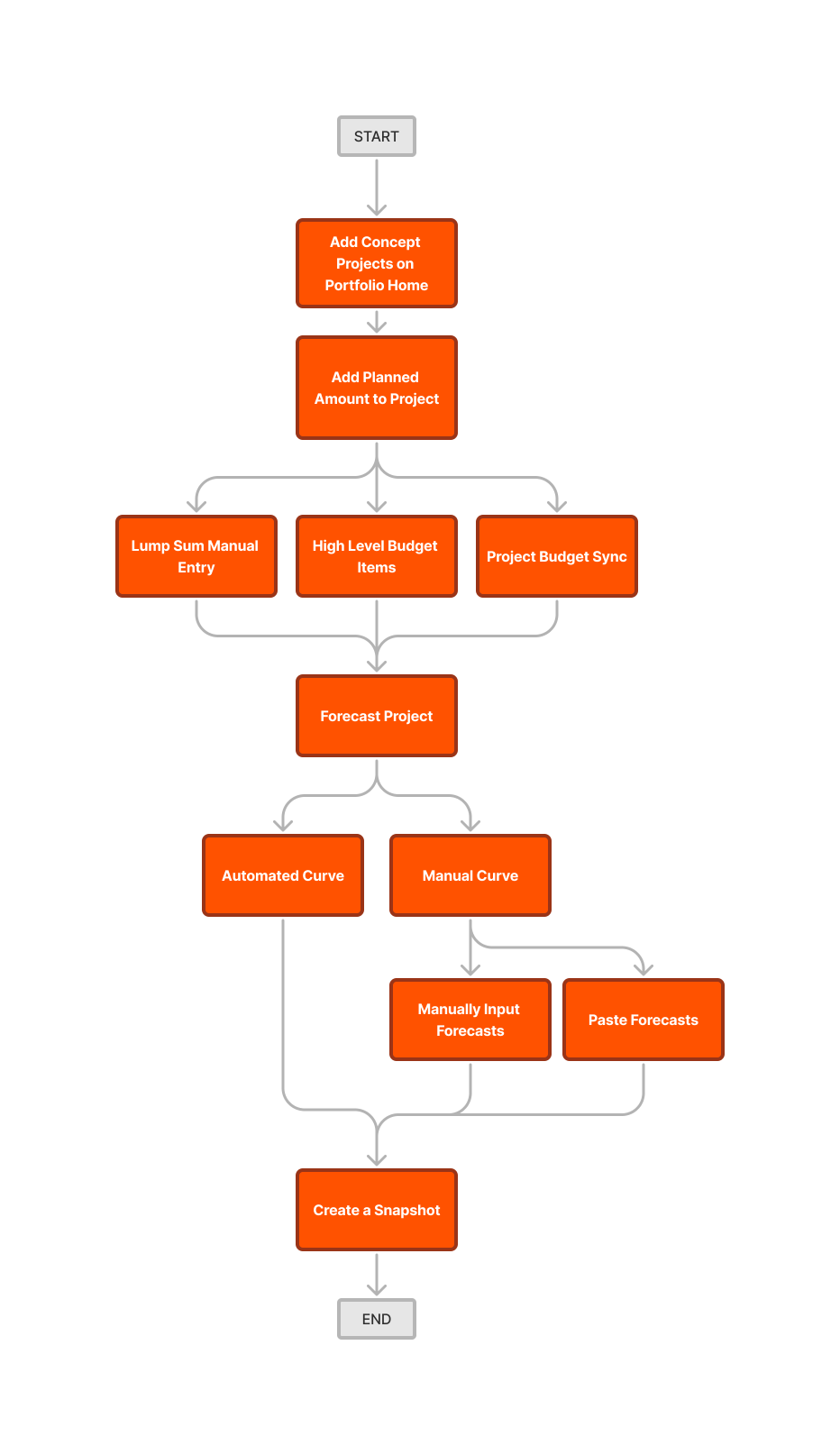
Capital Planning Workflow

capital-planning-createsnapshot