

Copy a Saved View Link in Capital Planning
Background
Copy a saved view link in Procore to share customized table layouts and data filters directly with colleagues in your organization. Sharing a direct link eliminates the need for team members to manually replicate complex column configurations and filter criteria.
Things to Consider
-
Required User Permissions:
-
'Admin' level permissions to create 'Company Views'.
-
'Standard' level permissions or higher to create 'Personal Views'.
-
-
Additional Information:
-
Recipient users must have an active user account in the same Procore company and project with appropriate tool permissions to access the shared view link.
-
Sending the copied URL allows recipients to open the exact filter and column arrangement saved to that view.
-
Steps
-
Navigate to the company's Capital Planning tool.
-
Click the
 Views button.
-
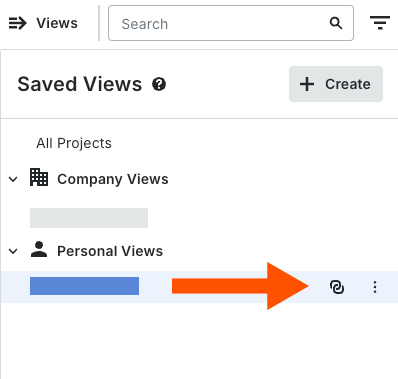
Select the relevant Saved View.
-
Click the Copy
 icon.
-
A green successful banner will appear saying "Share link copied to clipboard"
-
Paste the copied link into an email, message, or document to share it with team members in your Procore account.