September 2026
Below are the notable changes to the Procore web application for the month of September 2026.
Recent Changes
procore ai & datagrid - Control Tower Updates in Datagrid (09/25/2026)
Control Tower's navigation and budget-setup screens have a few updates based on customer feedback. The former Reports tab is now called Overview, and the former Budgeting tab is now called Budget. In the Budget tab, you can now pick your daily reset time from a clock instead of typing it in, and the daily and monthly credit limit fields show clearer guidance and error messages when a value is out of range. This is phase 1 of a broader round of Control Tower updates. Learn more about credit monitoring and budgeting.
procore ai & datagrid - Introducing Private Space (09/24/2026)
You can now create items (agents, datasets, pages, etc.) in a Private area visible only to you. From there, you can share an item with specific teammates using the Share button, without making it visible to the rest of the team, or move it into your team's shared Teamspace so everyone can see it. Both actions can be reversed, and only the item's owner can move it. This feature is available in Datagrid to all Datagrid and Procore AI plans. Learn more in Manage Your Private and Shared Items in Datagrid.
document management - Recycle Bin Expansion for Uploads and Placeholders (09/17/2026)
Procore Document Management now expands Recycle Bin support beyond submitted documents to include deleted uploads and placeholders from both the Uploads and Documents tabs. Soft-deleted items move to the Placeholders and Uploads collection in the Recycle Bin with a required deletion reason, while preserving original file metadata for authorized users to view and download. Deleting a filled placeholder recycles both the placeholder and its file together. Removing a file from a placeholder keeps the placeholder active and logs the removed file as a separate Recycle Bin entry. Strict permissions prevent users without Uploads tab access from viewing restricted file details. Restoring or permanently purging recycled items is not supported in this release. See How does the Recycle Bin work for Uploads and Placeholders in Document Management?
project map - Support for Drawing Locations on the Map (09/16/2026)
If you are using the Locations tool (Web), you can now draw locations directly on the map in the Project Map tool (Web). You can use the geometry shape (points, lines, and polygons) to draw the locations. Location geometry remains synchronized with the Locations tool, helping project teams create and manage spatial data in the map view where they work. With this update, superintendents, project engineers, and location admins can create and manage spatial boundaries and points in the same map view the rest of the project team already uses. See Draw Locations on the Map.
project map - Added Status-Based Pin Styling (09/16/2026)
The Project Map tool (Web) now uses color-coded pins to show item status at a glance across Observations, Inspections, Punch List, Incidents, and RFIs. A map legend explains the status colors, while status pills appear in the tool list and detail cards to provide consistent status context throughout the experience.
Pin colors update when an item’s status changes or the map refreshes, helping teams quickly identify open work, spot areas that need attention, and de-emphasize completed items without opening each record. The styling is also available on the web and Assets Map when viewing assets by icon. Photos and mobile map pins are not included in this release. See View the Project Map.
Procore Extracts 1.3.6 (09/16/2026)
-
Refreshed translations across supported languages for improved clarity and consistency.
-
General stability, security, and performance improvements.
Procore Imports 2.1.0 (09/16/2026)
-
The Punch import option now appears based on the Punch tool access configured on your account.
-
Fixed the in-app Support link so it consistently opens the correct help page.
-
Updated User import template header names to match the terminology used in the Procore web UI.
-
Refreshed translations across supported languages for improved clarity and consistency.
-
General stability, security, and performance improvements.
Procore Drive 4.1.0 (09/16/2026)
-
Photo thumbnails now load reliably in albums created directly within Procore Drive.
-
Drag and drop of files from Procore Drive to File Explorer is now consistent — files no longer get "stuck" mid-drop on some Windows configurations.
-
Folder and document sort order now matches the Procore web experience, so what you see in Drive lines up with what you see in the browser.
-
General stability, security, and performance improvements.
360 reporting - Faster Data Refresh in Reporting (09/15/2026)
The 360 Reporting tool now refreshes data in less than 10 minutes, reducing the previous refresh window of up to one hour. This improvement gives users faster access to current project data, enabling more timely insights and decision-making. See How fast will data refresh in 360 Reporting? for more information.
project map - Added Assets as a Project Item (09/15/2026)
Assets are now available as a project item m in the Project Map tool (Web). This update makes it easier to locate and manage project Assets without leaving the Project Map. You can:
-
View Assets as map pins or thumbnails.
-
Show, hide, and filter Assets from the Project Items list.
-
Select an Asset to open its details or navigate to the Asset record.
-
Pin, move, and remove Assets from the map. To learn more, see View Items on the Map.
resource planning - New Boards Experience Generally Available (09/15/2026)
The new Assignment Board experience is now generally available. The Assignments Boards allows you to see a single-day view of all active people and projects. You can see all active projects along with the resource requests and resource assignments for each project. To learn more, see View the Assignment Boards.
tasks - Admin Page Moved to the Modernized Web Experience (09/15/2026)
The company-level Tasks admin page – Task Item Configuration – now loads in Procore's modernized web experience within the Tasks tool (Web). Existing links and bookmarks continue to work and automatically redirect to the new page. The page layout, fields, validation, permissions, and task item configuration data remain unchanged, and no migration effort is required. The visible changes are the modernized navigation sidebar and faster page load times.
Unified Viewer: Expanded & Standardized Unified Viewer Keyboard Shortcuts (09/15/2026)
Procore updated and introduced new keyboard shortcuts across the Unified Viewer in the Documents, Specifications, and Document Management tools. The Hotkey Updates feature provided power users with full keyboard coverage for Connected Items panel toggles, measurement tools, and markup styling to reduce reliance on manual menu navigation. See What keyboard shortcuts are available in the Unified Viewer?
project archive - project archive enhancements (09/15/2026)
Procore has introduced several enhancements to the Project Archive tool, making it easier to create, manage, navigate, and audit archives. Users with ‘Admin’ level permissions to the Project level ‘Directory’ tool can view, edit, copy, or download archives created by other users within projects. You can search for items in Procore tools while creating or editing archives, select recently used tools during the archive creation process, and filter or group the change history of an archive. The Table of Contents in the extracted archives feature improved visual hierarchy and indentation, grouping related entries under their respective sections. See Project Archive. Additionally, Windows users can automatically restore truncated file and folder names in extracted archives using a CSV path-mapping file and a PowerShell script. See Restore Full Folder and File Names for Project Archives on Windows.
ASSETS - Company Level Map View (09/15/2026)
Procore added Map View to the Company level Asset tool, allowing users to visualize, pin, and manage assets spatially across the entire company. The Map View includes asset markers for spatial rendering, pinning capabilities for setting coordinates, and enabling integrated search and filtering. See View Assets on the Map.
insights - Added Overlapping Time Entries Insight at the Company Level (09/15/2026)
You can now use the Overlapping Time Entries Insight on the Company Insights side panel to identify workers with overlapping time entries across multiple active projects during a pay period. The Insight includes summary metrics, estimated duplicate labor cost, trends across the last three pay periods, project-level breakdowns, and detailed flagged timecard entries for review. This insight is available with the Project Execution Enterprise package. It helps payroll and operations teams identify and correct duplicate entries before they affect job costs. See Overlapping Time Entries Insights.
Project Admin: Default Fields (GA) (09/15/2026)
The Project Admin tool now features a new Defaults tab for Asset Types, allowing Project Admins to set project specific field default values and read-only rules without altering company wide standards. Previously, asset field defaults could only be managed globally at the company level, forcing teams to manually re-enter data or duplicate asset types to fit unique job requirements. This update gives project teams complete control to enforce job specific governance, automatically seed accurate initial data, and override or revert company settings on demand. To learn more, see Assign Configurable Default Fields for Asset Types and Company Assets - Permissions.
workflows - Improved Workflow Management with Linear Templates (09/15/2026)
Procore has introduced Linear Workflows as a new method for designing and executing sequential approval and hand-off processes within the platform. Linear Workflows utilized a table-based, step-by-step authoring experience at both the company and project levels to simplify the creation of straightforward workflows like RFI approvals and observation hand-offs. To learn more , see Create a Linear Workflow Template and Create and Configure Project-Level Linear Workflows.
ASSETS - Asset Data Quality with Status-Based Conditional Field Validations (09/15/2026)
Procore has introduced status-based conditional field validations within the Assets tool to ensure critical data is captured at specific points in the asset lifecycle. Status-Based Conditional Field Validations allowed Company Admins to configure rules that make specific default or custom fields mandatory or recommended when an asset transitioned into a particular status. To learn more, see Configure Field Rules for Status-based Validations.
WORKFLOWS - Assignee Management for Linear and Diagram Workflows (09/15/2026)
Procore has introduced new step-level assignee actions for both Linear and Diagram workflows, enabling users to add, remove, and ignore individuals during template configuration or within active, in-flight workflows. Item-level workflows will be available in October. The feature will initially be available for Observations only. To learn more, see Create a Linear Workflow Template.
Mobile Offline Support for Linear and Diagram Workflows (09/15/2026)
Procore has introduced offline support for workflows on the Procore mobile app, allowing field users to maintain productivity in locations with limited or no internet connectivity. Mobile Offline Support for Linear and Diagram Workflows provided users with the ability to create items, respond to workflow steps, and capture photos that automatically synchronized once a network connection was re-established. To learn more, see Offline Support for Linear & Diagram Workflows (iOS) and Offline Support for Linear & Diagram Workflows (Android).
materials - Purchase Order Import, Defect Unresolve, and List Enhancements (09/15/2026)
Procore enhanced the Materials tool with the ability for customers without Procore Financials to import purchase orders for receipt-to-invoice matching, a new admin action to unresolve a defect when it was closed in error, and list-view improvements including date-created columns, delivery-date visibility, and document state filters. See Import Purchase Orders to Materials and Unresolve Defects.
document management - Expanded Multi-Tenant SharePoint Integration & Integration Manager Governance (09/15/2026)
The Document Management tool now supports up to five active SharePoint tenant connections per project, allowing internal team members and external collaborators with upload permissions to seamlessly link files from their respective SharePoint environments into Procore without manual downloads. To complement this expanded access, Project Admins can now oversee, govern, and control all connected SharePoint environments directly within Project Settings using the new Integration Manager. Through this page, Project Admins can view SharePoint connection metadata, including Connection URL, Status, the name of the person who created the connection, and the date the connection was established. From here, they can dynamically disable or re-enable connections as needed, ensuring full organizational governance while preserving all previously linked files. See how to Link Files from SharePoint to the Document Management Tool and how to Manage SharePoint Connections in the Integration Manager in the Documents Management Tool.
documents - Pinning Capabilities for Connected Items in the Documents Tool (09/15/2026)
Procore has introduced the ability to pin connected items to specific locations on files within the Documents tool on web, enabling project teams to create durable spatial links for items such as coordination issues, observations, and RFIs. The pinning feature allows users to link existing items or create new ones directly from the document viewer, ensuring that references remain intact even as documents are revised. To learn more, see Pinning and Connected Items in the Documents Tool.
specifications - Specification Markup Creation for Mobile (09/15/2026)
Procore added the ability for mobile users to create and publish markups on specifications within the Specs tool for iOS and Android devices. Specification Markup Creation allows field teams to access the markup toolbar directly within a spec to author public or private annotations, ensuring full parity between the web and mobile experiences. To learn more, see Create and Manage Private and Public Markup Layers in the Specifications Tool (iOS) and Create and Manage Private and Public Markup Layers in the Specifications Tool (Android).
Insights - Added Workers Under 40 Hours Insight at the Company Level (09/15/2026)
You can now use the new Workers Under 40 Hours Insight on the Company Insights side panel to see which workers submitted fewer than 40 hours in the last pay period, and by how much, across the portfolio. This insight provides a summary of affected workers, projects, and total hours. It displays a trend chart showing workers under 40 hours by pay period. It also shows predicted labor gaps by trade and project-level details that expand to show each worker’s role, submitted hours, and hour gap. Teams can use this information to identify underutilized labor, rebalance crews, and plan worker reassignments more efficiently. See Workers Under 40 Hours Insights.
meetings - Admin Pages Moved to the Modernized Web Experience (09/15/2026)
The company-level Meetings admin pages – Meeting Templates and PDF Configurations – now load in Procore's modernized web experience within the Meetings tool (Web). Existing links and bookmarks continue to work and automatically redirect to the new pages. Creating, editing, assigning, permissions, fields, validation, and data remain unchanged. The visible changes are the modernized navigation sidebar and faster page load times.
specifications - Connected Items Pinning for Specifications (09/15/2026)
Procore expanded the 'Connected Items' pinning capability to the Specifications tool on the web, allowing users to spatially link items directly to specific sections within the viewer. This feature enabled project teams to pin and view Coordination Issues, Observations, RFIs, Inspections, and Punch List items, ensuring durable traceability that persists across document revisions. To learn more, see Pinning and Connected Items in the Specifications Tool.
Improved Visibility for Pinned Connected Items on Specifications (09/15/2026)
Procore enhanced the mobile experience for iOS and Android users by enabling the visibility of pinned Connected Items on specifications, ensuring parity with the web application. The Unified Viewer Mobile now displays pins for Coordination Issues, Observations, RFIs, Inspections, and Punch List items, allowing field teams to maintain spatial context and access linked items directly from their mobile devices. To learn more, see View Pins in the Specifications Tool (iOS) and View Pins in the Specifications Tool (Android).
document management - Full-Page Workflow History View & Bulk Exports (PDF/CSV/Markups) (09/15/2026)
Procore Document Management on Web now offers an expanded set of workflow review and export tools designed to streamline review cycles for Document Controllers and Design Review Managers. Users can access a full-screen, tabular Workflow History view through the workflow panel in the viewer, featuring customizable column visibility, quick filtering, and company-level default configurations set by company admins. Additionally, Document Management introduces bulk export actions directly from the Documents tab, allowing users to export workflow history for up to 300 documents at once as a combined PDF or a ZIP file containing individual CSVs with direct item links and attachments. Bulk download capabilities have also been expanded to support bulk PDF downloads for Public, Private, and Workflow markup layers.
360 reporting - September Data Release 2026 (09/15/2026)
Procore is releasing the September 2026 data update for the 360 Reporting tool, enhancing reporting capabilities for all users. This release will expand the available data columns and objects to enhance reporting capabilities across multiple tools. Users now have access to new data fields. To learn more, see 360 Reporting (Company): Data Change Log and 360 Reporting (Project): Data Change Log.
daily log - Supported Negative Quantities in Quantities Log (09/15/2026)
The Quantities log section in the Daily Log tool (Web) now supports negative quantity entries. Users can now log a negative quantity entry to record returns, corrections, or reductions directly. Negative values are reflected in running totals and included accurately in Quantities Log reports, helping teams maintain accurate quantity tracking without workarounds. See Create Quantity Entries.
Improved Workflow History Visibility for Mobile Devices (09/15/2026)
Procore has updated the 'Workflow History' side panel on the Procore mobile app to achieve event parity with the web application. The 'Workflow History' side panel now displays automated actions, bulk assignee changes, auto-assigned project roles, and workflow terminations to provide a complete and accurate history for users on Android and iOS devices. To learn more, see Workflow History Side Panel Event Parity (iOS) and Workflow History Side Panel Event Parity (Android).
Procore Imports: Automatic Transition to Standardized MSI Installation (09/15/2026)
Procore Imports has transitioned to a single, enterprise-ready installer technology (MSI), deprecating the legacy EXE installation path. Existing users on the Procore Imports EXE baseline (v1.7.0) are automatically prompted to update to version 2.0.1 upon launching the application, initiating a one-time setup wizard flow that uninstalls the legacy EXE software and installs the new MSI version. After completing the update, users will not experience any difference or change to their overall application experience. This release standardizes deployment and software updates across both individual workstations and centralized enterprise IT management tools while preserving existing login enforcement behavior.
procore drive - Automatic Transition to Standardized MSI Installation (09/15/2026)
Procore Drive has transitioned to a single, enterprise-ready installer technology (MSI), deprecating the legacy EXE installation option. Existing users on the Procore Drive EXE baseline (v3.1.0) are automatically prompted to update to version 4.0.1 upon launching the application or checking in-app notifications, initiating a one-time setup wizard flow that installs the new MSI software and uninstalls the legacy EXE version. After completing the update, users will not experience any difference or change to their overall application experience. This release standardizes deployment and software updates across both individual workstations and centralized enterprise IT management tools while maintaining existing version login enforcement behavior.
Document Markup Creation for Mobile (09/15/2026)
Procore expanded the markup authoring capabilities within the Documents tool to include mobile users on iOS and Android devices. The markup toolbar allowed users to create and publish public or private annotations directly within a document, ensuring that supported markup types mirrored the existing web experience. To learn more, see Create and Manage Private and Public Markup Layers in the Documents Tool (iOS) and Create and Manage Private and Public Markup Layers in the Documents Tool (Android).
Assets - Asset Management with Bulk Actions in Map View (09/15/2026)
Procore has introduced bulk action capabilities to the project-level Map View within the Asset Register tool, providing parity with the existing List View functionality. The Bulk Actions feature allowed users to select multiple assets using individual markers or the lasso tool to perform shared updates, such as editing fields, updating statuses, adding attachments, deleting records, and printing QR codes. To learn more, see Edit Asset Statuses, Manage Attachments for Assets in the Project Assets Tool, Delete Assets in the Project level Assets Tool, and Generate QR Codes for Assets.
Fullscreen Viewer Navigation for Drawings on Mobile (09/15/2026)
Procore released a fullscreen viewer navigation drawer for the Drawings tool on mobile devices to allow users to quickly switch between drawings within the same area. The fullscreen viewer navigation drawer reduced navigation friction and restored faster in-flow drawing reviews for users in the field. To learn more, see View Drawings (iOS) and View Drawings (Android).
Improved Document Visibility for Mobile Users (09/15/2026)
Procore introduced the ability for mobile users on iOS and Android to view pinned Connected Items directly on files within the Documents tool. The 'View Pins' feature allowed field teams to see spatial context for Coordination Issues, Observations, RFIs, Inspections, and Punch List items while reviewing documents on their mobile devices. To learn more, see View Pins in the Document Tool (iOS) and View Pins in the Document Tool (Android).
ASSETS - Improved Asset Management with Inline Editing in Asset Register (09/15/2026)
Procore has introduced inline editing capabilities to the Asset Register grid, allowing users to update common asset fields directly without navigating to the Asset Details page. The Asset Register now supports in-cell editing for fields such as Name, Trade, Location, and various custom fields to streamline data management workflows. To learn more, see Edit Assets in the Company Assets Tool and Edit Assets in the Project level Assets Tool.
equipment - View Onsite Equipment on the Company Map (09/15/2026)
Procore has added the ability to see equipment on the Company level Equipment map without telematics. Equipment marked 'onsite' will display on the map based on the project’s address. See Set 'Onsite' Field for Equipment and View Equipment on the Map.
equipment - Add Company Level Equipment to Project Tools (09/15/2026)
Procore has added the ability to add equipment from the Company level Equipment tool when creating daily log entries, incidents, inspections, T&M tickets, or timesheets. See Create an Inspection, Create Equipment Entries, or articles about adding records to incidents.
equipment - View Vendor in the Equipment Register (09/15/2026)
Procore has added a vendor filter and column in the Equipment Register, in both the Project and Company level Equipment tools. See Configure the Equipment tool.
procore AI & datagrid - Stable outbound IPs for Agent Server traffic now available for allowlisting (09/11/2026)
Procore AI and Datagrid agents that connect to external systems now have stable outbound IP addresses for Agent Server traffic, so IT and security teams can allowlist those addresses. These addresses are designed to stay consistent across infrastructure updates to help reduce ongoing firewall maintenance for organizations with restricted network policies. Learn more about allowlisting.
Production outbound IPs:
-
54.174.198.5
-
34.196.65.237
project map - Location Access Prompt Now Triggered by User Action (09/11/2026)
The browser location permission prompt no longer appears on map load in the Project Map tool (Web). Instead, it is triggered only when a user explicitly selects Use Current Location. This change applies to Project Map and all embedded map experiences that use the shared location control. Previously, the Project Map tool requested browser location permission as soon as the map loaded — even when a user wasn't intending to use their current location. With this enhancement, the browser location permission prompt is no longer shown on initial map load, reducing workflow interruption.
Note: Browser permission settings remain the same. Location accuracy and search results are unaffected.
procore AI - annual credit option for new digital coworker contracts (09/09/2026)
Companies signing a new Pro or Enterprise Digital Coworker contract to add Procore AI can now choose annual credit allocation instead of monthly. Choosing annual means your full yearly credit amount is available at the start of the term rather than an allotment refreshing each month, which helps when project workloads are uneven across the year.
Procore AI & Datagrid - Simplified Chat Controls and a Smarter Default Mode (09/02/2026)
Modifying your AI chat settings in Procore AI and Datagrid is now simpler with consolidated controls. These changes help you optimize results without losing momentum:
-
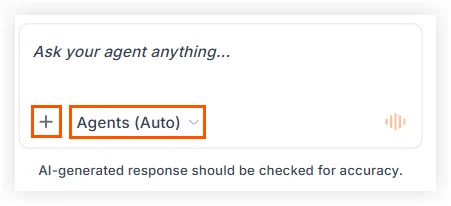
Streamlined agent selection: Agent selection is now the most prominent option in the chat box, and it’s easier to switch from Auto agent selection to your preferred agent(s).
-
Plus + menu: Add attachments, actions, tools, or switch to a different LLM, by clicking the plus icon. This is also where you manage your agent memories, prompt library, and more. No functionality is removed — these options just live in one place now instead of dispersed across several menus.
We’ve also improved the default mode, Agents (Auto), so that it handles simple questions itself, uses tools as needed — including any you’ve added from the plus + menu — and calls a specialized agent when the work clearly belongs to one. Or, if you name an agent in your message, you stay in Auto mode, and it uses that agent to assist with your task. Instead of having the Ask or Execute toggle, Auto now decides how to handle each request for you. Learn more in Manage Your AI Chat Controls.