

Create and Sync Vendors with Sage 100 Contractor®
Objective
To create and sync vendors when Procore's ERP Integrations tool is configured for Sage 100 Contractor®.
Background
The integration between the vendor data in Procore and Sage 100 Contractor® is bidirectional. This means that that your project's vendor data can be synced between the two systems in these ways (1) From Procore to Sage 100 Contractor®, or (2) From Sage 100 Contractor® to Procore. To learn the specific steps for creating and syncing data between the two systems, see the Demo, Workflow, and Steps below.
Things to Consider
- Required User Permission:
- 'Admin' level permission on the company's ERP Integrations tool.
AND - 'Admin' level permission to the company's Directory tool.
- 'Admin' level permission on the company's ERP Integrations tool.
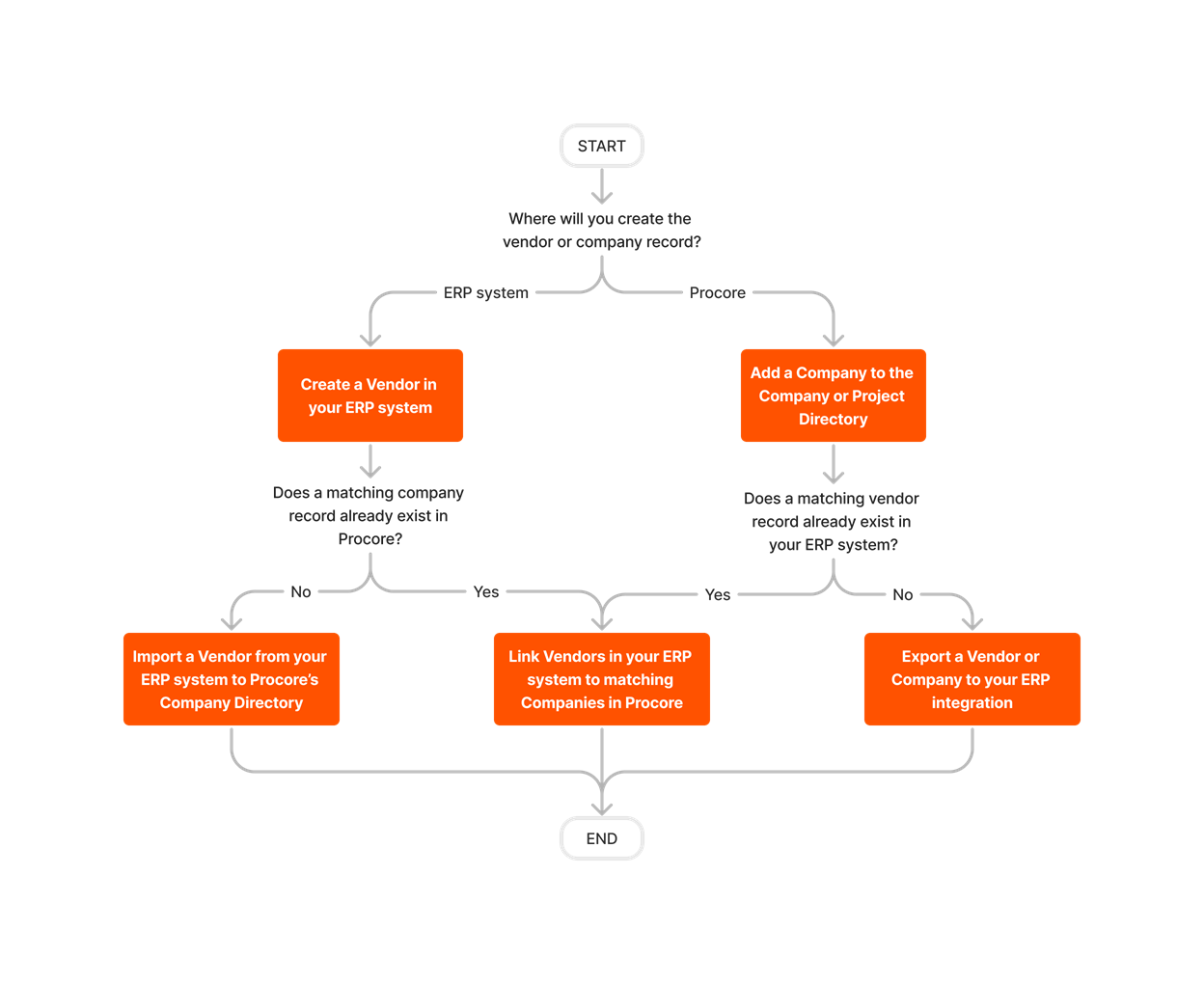
Workflow


Steps
- Determine where you want to create your company records: In Procore or in Sage 100 Contractor®.
- If you have created company records in Procore:
- First, complete the steps in Add a Company to the Project Directory or Add a Company to the Company Directory.
- Next, determine if the matching vendor record exists in Sage 100 Contractor®:
- If the matching record exists in Sage 100 Contractor®, see Link a Sage 100 Contractor® Vendor to a Procore Company.
OR - If the matching vendor record does NOT exist in Sage 100 Contractor®, see Export a Vendor/Company to Sage 100 Contractor®.
- If the matching record exists in Sage 100 Contractor®, see Link a Sage 100 Contractor® Vendor to a Procore Company.
- If you have created vendor records Sage 100 Contractor®:
- Determine if the matching company record exists in Procore. Then:
- If the matching company record exists in Procore, see Link a Sage 100 Contractor® Vendor to a Procore Company.
OR - If the matching company record does NOT exist in Procore, see Add a Sage 100 Contractor® Vendor to Procore's Company Directory.
- If the matching company record exists in Procore, see Link a Sage 100 Contractor® Vendor to a Procore Company.
- Determine if the matching company record exists in Procore. Then: