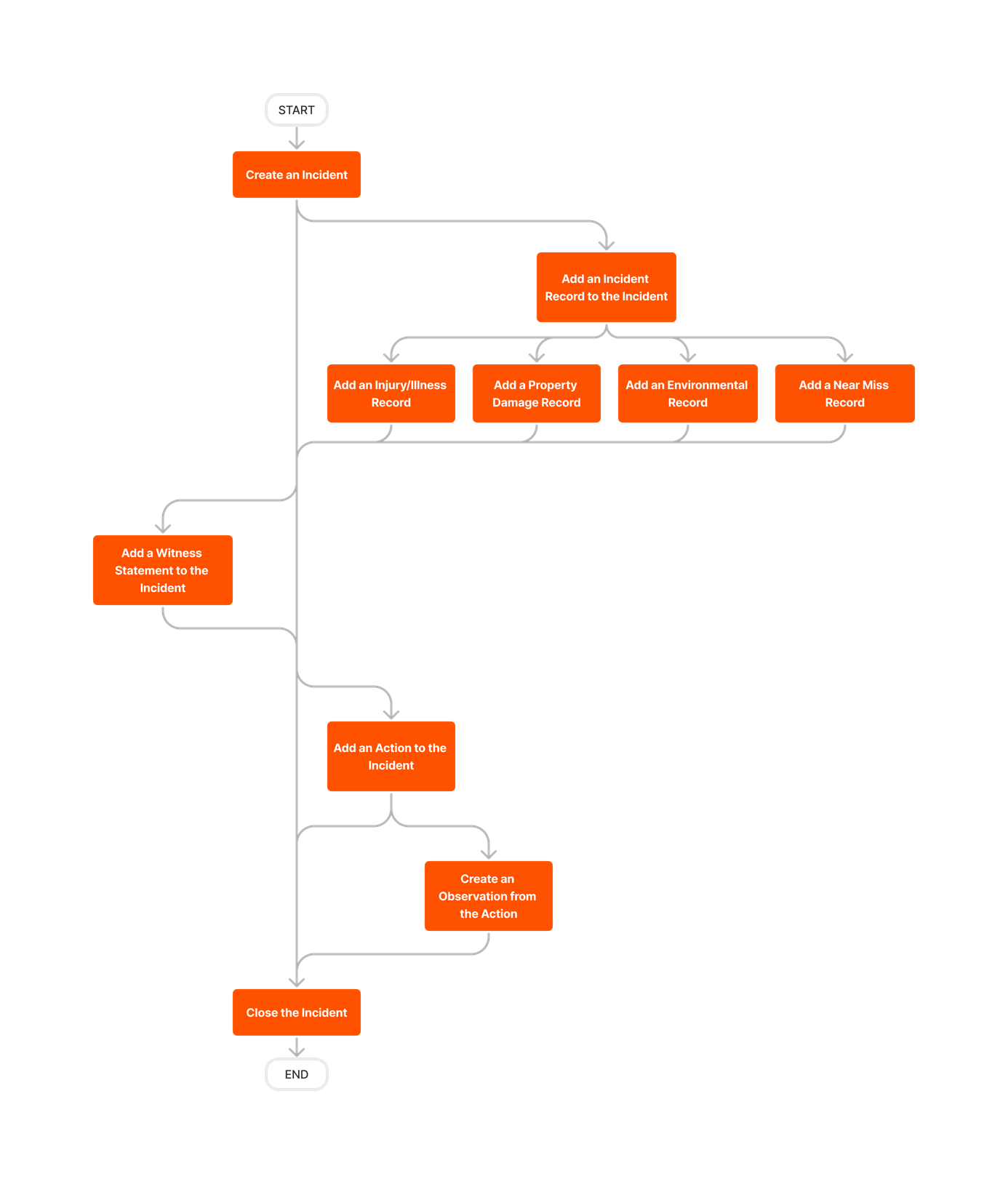
The Incidents tool keeps track of safety-related issues so your team can manage risk, identify trends, and harness valuable data to better understand how to prevent unfortunate incidents in the future.
Popular Tutorials (view all)
Top FAQ (view all)
There are no items that match your search query.
To browse and search all Procore training videos, visit our video library.
Video content may not accurately reflect the current state of the system, and/or it may be out of date.


Learn which user permissions are required to take the described actions in this tool.
Users can take the action with this permission level.
Users can take this action with this permission level AND one or more additional requirements, like granular permissions.
|
Incidents Tutorials |
None |
Read Only |
Standard |
Admin |
|
|---|---|---|---|---|---|
|
Add Assignees to an Incident |
|
|
Admin users can assign 'Standard' and 'Admin' users to Incidents. |
||
|
Add a Contact to an Incident |
|
|
User also need 'Read Only' level permissions or higher to the project's Directory tool with the 'Create Contacts' granular permission. |
||
|
Add a Record to an Incident |
|
|
|||
|
Add a Related Item to an Incident |
|
||||
|
Add a Witness Statement to an Incident You Created |
|
|
|||
|
Add an Action to an Incident You Created |
|
|
|||
|
Add an Action to Any Incident |
|
||||
|
Add an Environmental Record to an Incident You Created |
|
|
|||
|
Add an Environmental Record to Any Incident You Created |
|
||||
|
Add an Injury/Illness Record to an Incident You Created |
|
|
|||
|
Add an Injury/Illness Record to Any Incident |
|
||||
|
Add a Near Miss Record to an Incident You Created |
|
|
|||
|
Add a Near Miss Record to Any Incident |
|
||||
|
Add a Property Damage Record to an Incident You Created |
|
|
|||
|
Add a Property Damage Record to Any Incident |
|
||||
|
Close an Incident You Created |
|
|
|||
|
Close Any Incident |
|
||||
|
Configure Advanced Settings: Incidents |
|
||||
|
Configure a Custom Workflow Template for Incidents on a Project |
|
|
|
||
|
Create a Custom Workflow Template for Incidents |
|
|
|||
|
Create a New Location for an Incident |
|
|
The 'Only allow locations to be created in the Location Manager' setting must be disabled in the Locations settings of the project's Admin tool. |
||
|
Create an Incident |
|
|
|||
|
Create Conditional Custom Fields |
|
Users must also have 'Admin' permissions to the Company level Admin tool. |
|||
|
Create Project-Only Equipment |
|
|
Users must also have one of the following permissions to the project's Equipment tool:
|
||
|
Delete an Incident |
|
||||
|
Delete an Incident Record |
|
||||
|
Edit a Near Miss Record You Created |
|
|
|||
|
Edit Any Near Miss Record |
|
||||
|
Edit an Incident You Created |
|
|
|||
|
Edit Any Incident |
|
||||
|
Edit an Injury/Illness Record You Created |
|
|
|||
|
Edit Any Injury/Illness Record |
|
||||
|
Email Incidents You Created |
|
|
|||
|
Email Any Incidents |
|
||||
|
Export Incidents as a PDF or CSV |
|
|
|
||
|
Search and Filter Incidents |
|
|
|
||
|
Retrieve an Incident From the Recycle Bin |
|
||||
|
View an Incident (Not Private) |
|
|
|
||
|
View an Incident (Private) |
|
|
|
'Read Only' and 'Standard' level users must also be the Incident's Creator, Assignee, Alert Recipient, or a member of the Distribution List. |
|
|
View Project Incident Insights |
|
|
|
Below are the notable changes to the project's Incidents tool.
Procore introduced a dedicated root cause analysis form within the Incidents tool, enabling a more structured and thorough process for identifying the underlying causes of incidents. The root cause analysis form release offers granular permissions, a configurable fieldset, and the flexibility to hide the section if not applicable to your business needs.
Procore introduced conditional custom fields for the General Information section within the incident form, streamlining the incident creation process by displaying only relevant fields to users. Conditional custom fields reduce form completion time and improve data quality by eliminating unnecessary steps and minimizing data entry errors.
When adding records to incidents, the 'Equipment' field now pulls in equipment records from the Project level Equipment tool. See Create an Incident.
Procore has streamlined the process of creating Observations from Incidents by aligning the category/type dropdown in the Incidents tool with the Observations tool. This enhancement ensures a consistent and seamless experience for users, allowing them to easily search for and select the desired Observation category.
The Incidents tool now has a modernized, more intuitive layout and design. There are no changes to functionality. See Incidents to learn more about this tool.