

View the Executive Dashboard in the Portfolio Tool (Legacy)
Background
The Portfolio tool includes an Executive Dashboard that shows a pictorial view of the active projects in your company's account.
Things to Consider
Prerequisites
-
To get the most out of your Executive Dashboard, we recommended that your company create the following items for use with Procore:
Steps
-
Navigate to your company's Portfolio tool.
-
Click the Executive Dashboard tab.

-
View each of the available charts:
-
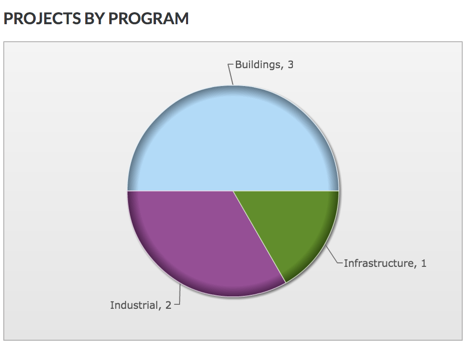
Projects by Programs. Reveals a pie chart showing the total number of Procore projects in your company's account by program.
-
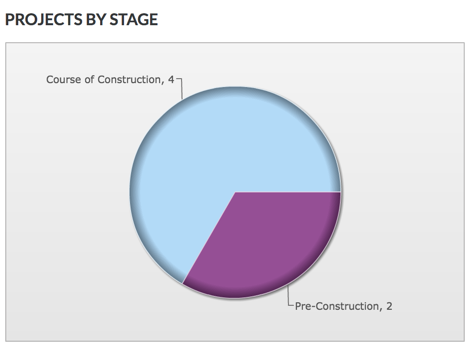
Projects by Stage. Reveals a pie chart showing the total number of Procore projects in your company's account for each project stage.
-
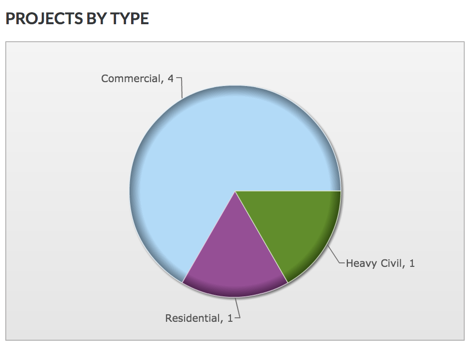
Projects by Type. Reveals a pie chart showing the total number of Procore projects in your company's account for each project type.
-
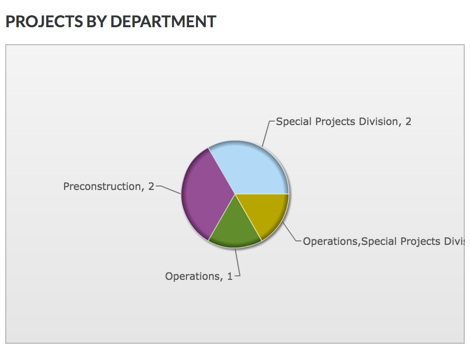
Projects by Department. Reveals a pie chart showing the total number of Procore projects in your company's account for each department.
-
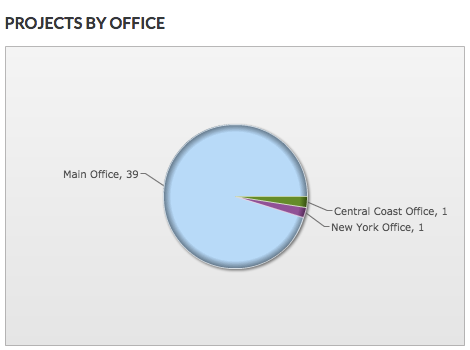
Projects by Office. Reveals a pie chart showing the total number of Procore projects in your company's account for each office location.
-