

Unlock a Budget with Budget Modifications
| Back | Current Lesson - 13/19 | Next |
The ability to unlock a budget with budget modifications allows users to update their Original Budget Amounts throughout the course of a project and track how the Original Budget has evolved. For certain projects, the Original Budget may continue to change and update after construction has begun. This is particularly common for projects with Guaranteed Maximum Price (GMP) contracts, and large-scale projects in general, where construction is underway even as the owner(s) are approving additional phases or work packages.
- Navigate to the project's Budget tool.
- Click Unlock Budget.
Notes
- The Unlock Budget label is only visible when the project's budget is locked. See Lock a Budget.
- If the Unlock Budget is grayed out and unavailable and your company has enabled the ERP Integrations tool, you will need to click the Retrieve from ERP button first. See Retrieve a Budget from ERP Integrations Before Acceptance.
- Choose from these options:
- To preserve all budget modifications, click Preserve and Unlock in the Unlock the Budget window.
OR - To delete all budget modifications, place a checkmark in the Delete All Budget Modifications (Not Recoverable) box. Then click Delete and Unlock.
Note: If your company has enabled the ERP Integrations tool and the project's budget modifications have previously synced with your integrated ERP system, the Delete and Unlock button will be grayed out and unavailable. Budget Modifications can only be preserved and unlocked.
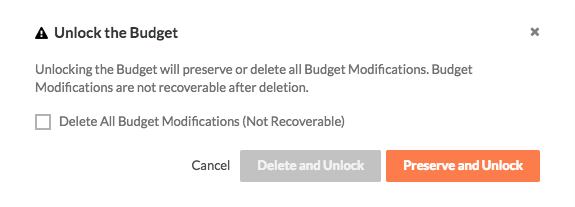
- To preserve all budget modifications, click Preserve and Unlock in the Unlock the Budget window.