

KAST Procore Daily Log Guide (KAST)
Background (the "Why")
Daily Reports ("Daily Logs" in Procore) are an important part of the construction documentation process. Daily Reports document the history of the project from the KAST point of view. They are a way for off-site project team members such as Project Executives, Owners, Design Team members, etc. to keep up with the progress of the project. They also serve to document the weather conditions, what work was done on what day and in what location, what material is delivered and when, any recordable accidents, explain issues potentially impacting schedule or cost, and document visitors.
In court, a Construction Daily Report is a record of the job day by day. Fluctuations in manpower recorded on Daily Reports may be used to document delays due to lack of Owner decisions or Design Coordination. Recorded manpower counts can be used to later evaluate time and material claims. Daily Reports may also be used by Owners to counter KAST delay claims where we have noted delays caused by subs. It is important to be brief, and state "just the facts" without emotion when completing Daily Reports.
In addition, completion of the Daily Log is a valuable tool for the field staff, Lead Superintendent, and Lead Project Manager on the project. In completing a Daily Log, the Lead Superintendent is taking the time to review what did and did not happen that day, who did and did not show up, what work did and did not get completed, what deliveries did and did not happen... By taking the time at the end of each day to review and edit/approve the subcontractor's manpower, review the inspections, deliveries, weather, visitors, and dumpster pulls, and log any KAST-rented equipment on site you are better equipped to plan the work for the following day and beyond. In short, it is an opportunity to catch up on the day and plan for the following day(s). It is an opportunity for YOU to collect your thoughts, record them, and be better prepared for the day(s) to come.
Procore also has a standard report called the Daily Log Manpower Report. This report can be an invaluable tool when you need help recalling on what day a specific activity happened, or who was on site, or who WASN'T. You can also use this report to validate, or invalidate, T&M ticket requests. It is filterable by contractor and date range and can be aggregated by day, week, month, or year. Below is a screen shot of what a Daily Log Manpower Report looks like when site staff has been doing a good job on their Daily Log manpower entries.

Responsibility
It is the responsibility of the Lead Project Manager and Lead Superintendent on a project to ensure that the Daily Logs are completed on a daily basis.
-
This may be achieved by delegating the data entry to the following or some combination thereof, but it is the responsibility of the Lead Superintendent and Lead Project Manager to ensure that the Daily Log is complete and accurate at the end of each day.
- Project Admin
- Project Engineer
- Assistant Project Manager
- Project Manager
- Assistant Superintendent(s)
- Trade Superintendent(s)
- Area Superintendent(s)
- Subcontractor
- Foreman
- Superintendent
- Project Manager
- The Lead Superintendent will complete the following at the end of each day on the Daily Log for that day:

Setup of the Daily Log
- The following boxes must be checked in the settings
- Show Created By On Log Entries
- Show Related To On Daily Log
- Show the Trade field on the Manpower Log
- Default Distribution should include, at a minimum, the lead Project Manager on the project
- Allow Collaborator Entry on the following Categories
- Manpower Log
- Delivery Log
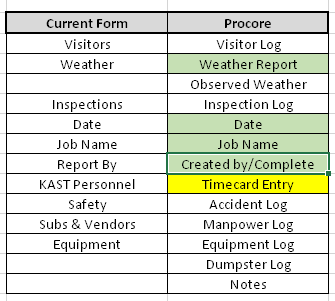
Completion of the Daily Log
The following categories are mandatory and must be completed on a daily basis
-
Weather Log
- Observed Weather Conditions
- Weather Report (auto-populated from nearest weather station)
-
Manpower Log
- Include one entry per location, per subcontractor
- Include trade for each entry
- Attach copy of Subcontractor's own daily report to one line item per subcontractor
- Subcontractors may complete their own entries
- Must be reviewed & approved by KAST
- Must include copy of their form (if any)
- "subcontractor didn't do his entry" is not a valid excuse for not entering their manpower
- if sub doesn't enter, KAST site staff must enter
- if sub writes "see attached" in Comments then:
- KAST site staff must enter description for them
- -or-
- KAST site staff must require subcontractor to comply and enter valid Comments
- Subcontractors may complete their own entries
- DO NOT
- Enter multiple subcontractors on one line
- Sign off the day with "see attached" entries from subcontractors
- If the sub has written "see attached" and attached their internal log, you must:
- enter your own description of their work
- make them fix it
- If the sub has written "see attached" and attached their internal log, you must:
- Make entries that consist only of photos of your handwrittten notebook
- this is virtually useless, as it's not reportable, not trackable, not validated, etc.
-
Notes Log
- Available for any notes or comments that do not fit into the other categories
- this is also where you can make your notes throughout the day to use when validating sub's entries
- Once the manpower is approved and the report is signed:
- the "Comments" on manpower should only reflect the activities of that company, on that day, in that area
- Once the manpower is approved and the report is signed:
-
Visitor Log
- Record all visitors to the site
- Include KAST employee visitors not part of project team
- Note the purpose of their visit
- Record all visitors to the site
-
Inspection Log
- Inspection types to include
- Building Department/AHJ
- Threshold
- 3rd party QC or Safety
- LJP
- Post Tension (PTE)
- Owner's Consultants
- Waterproofing
- FHA
- Life Safety
- Include
- Inspection Type
- Inspecting Entity
- Inspector Name
- Location
- Description
- Attach any documentation from the inspector
- Inspection types to include
-
Equipment Log
- Only completed if there is KAST-owned or KAST-rented equipment on site
-
Delivery Log
- Only completed when deliveries occur
- May be completed by the subcontractors receiving the delivery
- Must be verified by KAST employees
-
Dumpster Log
- Only completed when dumpsters are delivered, removed, or emptied
-
Accident Log
- Only completed if there is a recordable incident on site