Best Practices for Field Team Members Using the Document Management Tool
Introduction
Procore's Document Management tool provides a single place to access, view, and collaborate on a project's documents that you have access to. The tool is available on Procore's web and mobile applications.
- Web: See Document Management for more resources about the web tool.
- Mobile: See Document Management (iOS) or Document Management (Android) for more resources about the mobile tool.
This article covers the following topics:
Use Saved Views and Filters to Find Documents
The Document Management tool has a list of saved views, such as Approved Drawings, that help users quickly access documents. Unlike traditional folders, saved views dynamically update when a relevant revision is available for a user with permissions to view it. Admins and users can create additional saved views for the project or themselves. See About Saved Views in the Document Management Tool to learn more and create your own saved view.
Saved views on web
Any user can create a saved view on the web version of the tool. Project admins can create collections and saved views that are available to everyone on the project. See Create a Saved View in the Document Management Tool to learn more about creating saved views that are then accessible on a mobile device in the field. |
Saved views on mobile
Tap a saved view to see all documents fitting that collection and saved view's filters. To learn more about using saved views and filters for easy retrieval of the correct document revision, see Search for and Filter Documents in the Document Management Tool (iOS) or Search for and Filter Documents in the Document Management Tool (Android). |


Quickly Access Drawings and Specs from the Procore Mobile App
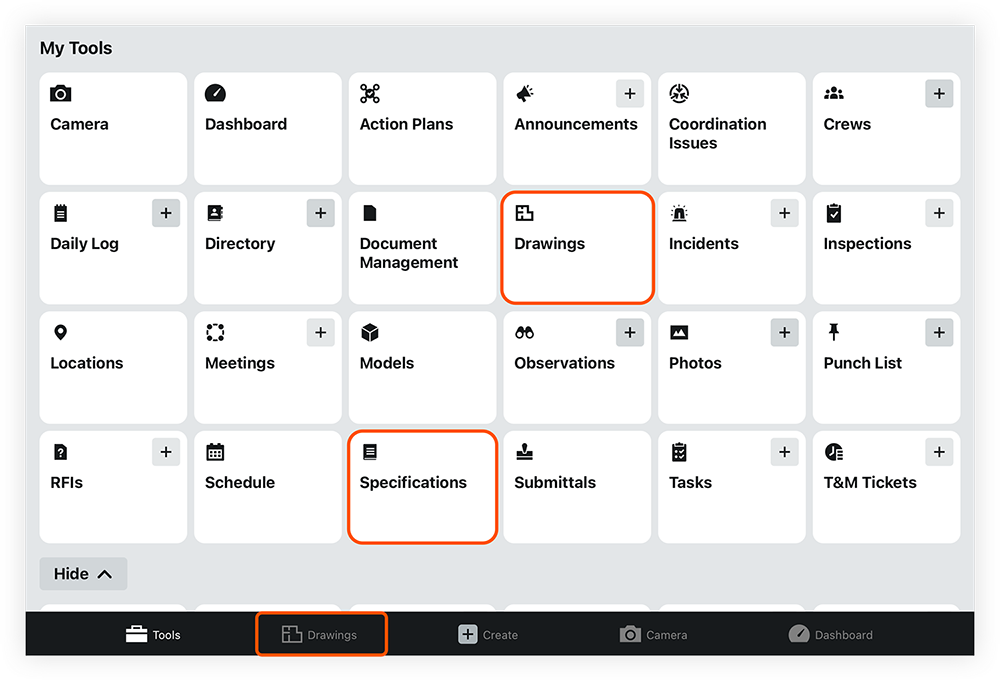
You can quickly access drawings and specification documents within the Document Management tool by tapping the 'Drawings' or 'Specifications' tool in the Procore app.
Note: The app will not redirect to the Document Management tool if the Drawings or Specifications tools are active on the project.
- Open the Procore app on your iOS or Android mobile device.
- Log in if necessary and select your project.
- Tap Drawings or Specifications.
The Document Management tool automatically opens and shows documents in the 'Drawings' or 'Specifications' saved views. You can adjust the filters further if needed. See Search for and Filter Documents (iOS) or Search for and Filter Documents (Android). - Tap a document's name to open it in the viewer. See View Documents (iOS) or View Documents (Android).
Customize Your View
You can adjust the search results on web and mobile.
- On web: You can adjust, rearrange, and pin columns in the documents list as needed. See Configure Your View in the Document Management Tool.
- On mobile: You can change the visual appearance of document results. See Configure Your View in the Document Management Tool (iOS) or Configure Your View in the Document Management Tool (Android).
- However, view adjustments and filter changes made in the mobile app cannot be saved.
View Documents
- On web: You can show or hide markups made to the document, view different revisions, search the text, view the approval workflow, and more. See View Documents in the Document Management Tool.
- On mobile: You can show or hide markups made to the document, filter markups, view different revisions, search the text, and more. See View Documents in the Document Management Tool (iOS) or View Documents in the Document Management Tool (Android).
Download Documents
- On web: You can download documents and export information from the Document Management tool in Procore's web application by clicking the download
 icon for a document. See Download Documents and Export Information. If documents have been shared in a correspondence item, you can download them from the Attachments section. See View and Download Document Management Files in a Correspondence Item.
 - On mobile: You can sync or download documents from the Document Management tool in Procore's mobile app. See Sync and Download Documents from the Document Management Tool (iOS) or Sync and Download Documents from the Document Management Tool (Android).