

Configure the Company Home
New Version Available
Procore Home has replaced the legacy Company Portfolio page and is enabled by default. Learn more about the difference between the legacy Company Portfolio page and the new Procore Home.
To return to the legacy Company Portfolio, Company Administrators can navigate to the Company Portfolio / Procore Home tool, click Manage Settings and toggle Procore Home OFF.
OFF.
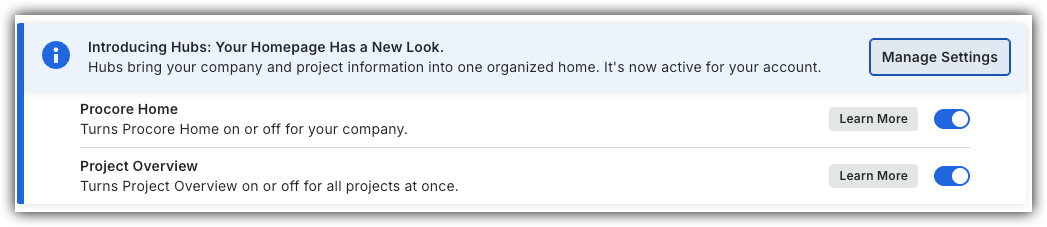
However, later this year it will be sunset and will no longer be available. If your company reverted to the legacy Company Portfolio experience, Company Administrators can re-enable the Procore Home experience in Procore Explore. (US 2 | UK)
Background
Company Admins can standardize the Company Home for their entire team. You can rearrange or resize the information cards, ensuring a consistent view across the organization.
Things to Consider
-
Required User Permissions on the company's Procore Home tool.
-
Additional Information:
-
Updates made to the Procore Home are reflected for all users.
-
Currently, if you remove a card, you cannot add it back.
-
Steps
-
Navigate to the company's Portfolio tool or Home.
-
Click the tab's vertical ellipsis
 .
.

-
Click Edit View.
Move and Resize Information Cards
-
Click Edit View.
-
Click and hold the information card and drag it to the location that you want on the page.
-
Click and hold the resize
 icon in the information card's corner and drag the card until it's the size you want.
-
Optional: Click the Actions menu and select one of the following:
-
Discard Changes: Reverts updates made in the current edit session.
-
Align Cards: Removes layout gaps in the current view.
-
Set to Template: Applies the latest template layout for the current hub.
-
-
-
Required User Permissions on the company's Procore Home tool.
-
Additional Information:
-
Updates made to the Procore Home are reflected for all users.
-
Currently, if you remove a card, you cannot add it back.
-
Remove Information Cards
Important
At this time, you cannot add back a removed card.-
Click the delete
 icon.
icon. -
Click Remove Card to confirm.
Rename Portfolio Tab
-
Click the Overview tab's vertical ellipsis
and click Rename. -
Click Save.