

Review Submitted Bids
| PREVIOUS | CURRENT LESSON (22 of 28) | NEXT |
Navigate to the project's Bidding tool.
- Click View next to the bid package you want to view submitted bids for.
- Navigate to the Bidders subtab.
- Click Add Filter.
- In the Add Filter drop-down list, click Submission Status and then mark the Submitted checkbox in the secondary list.
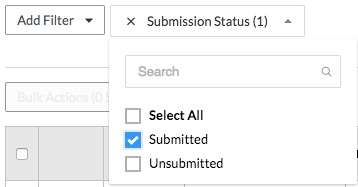
You will then see all submitted bids and their bid amount.
Note: If you enabled blind bidding, you will not be able to see the bid amount until the bidding period is over.