

Edit Spec Sections in the Admin Tool
| BACK - Lesson 14 | Current Lesson 15 | Lesson 16 - NEXT |
- Navigate to the project's Admin tool.
This reveals the Admin page. - Under 'Project Settings', click Spec Sections.
- Click the blue caret in the upper-right corner of the desired cell.
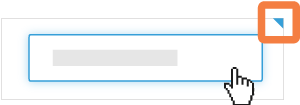
- Type the updated information into the appropriate cell. (Note: Duplicate number and description combinations are not allowed, and will not be saved.)
- Press ENTER on your keyboard.
The system saves your updates.