

Align - Service Requests
Department: Equipment Department
Topic: Align Mobile App
Process: Service Requests
Objective
To efficiently and effectively handle user-initiated requests for routine services, ensuring they are fulfilled promptly and consistently. This involves standardizing the process for receiving, tracking, and fulfilling requests, ultimately improving user experience and operational efficiency.
Background
The advantages of the Mobile app include the ability to create Service Request showing the changes almost immediately to all connected device throughout the system. The portability and flexibility provided by having a mobile interface will allow companies a more comprehensive and timely perspective of their operations.
Creating a Service Request:
|
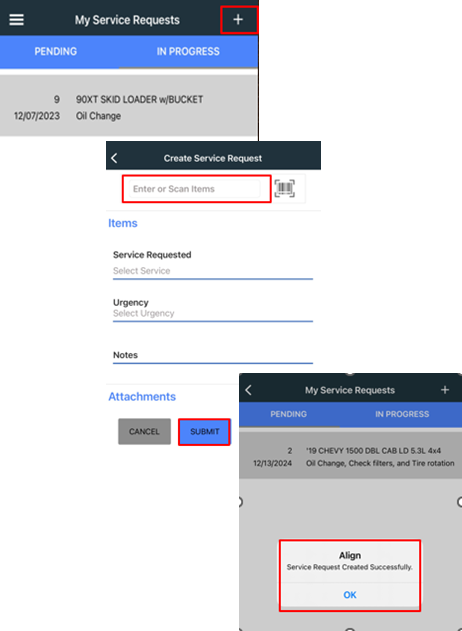
1. Click the plus sign to create service request. a. Enter the Tool Number b. Fill out the following: i. Service Requested ii. Urgency iii. Notes iv. Attachments (if applicable, pictures) c. Once done SUBMIT Ticket. i. Notification will pop up with Service Request Created Successfully.
Viewing a Pending or In Progress Request 1. Pending: The Equipment Department has not looked at the request yet. 2. In Progress Request: The Equipment Department is working to complete this request. 3. Completed Request: It will no longer be seen in the My Service Request. |
 |