

Align - Equipment Usage Log
Department: Equipment Department
Topic: Align Mobile App
Process: Equipment Usage Log (Company Vehicles)
Objective
Equipment Usage Log is to maintain a detailed record of when, where, and by whom company vehicles is used, along with any associated maintenance or issues.
Background
The Mobile App includes the ability to create Equipment Usage Log, showing the changes almost immediately to all connected devices throughout the system. This replaces the need for manual synchronization, saving time and eliminating potential errors while resulting in increased productivity and profitability for the company.
My Equipment Usage:
|
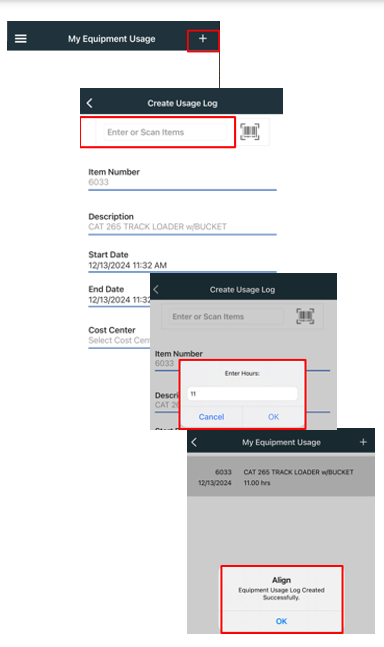
1. Click the to create a new Equipment Usage Log. 2. Enter in Tool Number (Your Truck Number) at the top. 3. Proceed to fill out the following: a. Item Number b. Description – will fill out once Truck Number is entered. c. Start Date d. Enter Date e. Cost Center (Job Number) f. Operator (Your Name) g. Hours Used (Mileage) – This will need to be input everyday/weekly. How many miles to and from your job is just like the Mileage Log Sheet. Included in Mileage will be personal miles and miles to the jobsite. Note: If you go to multiple jobs then you need to input miles for each jobsite. This will require you to create a new equipment usage log for each job location. 4. Once all is filled out click SUBMIT at the bottom. |
 |