Submit Documents in the Document Management Tool
Background
After documents have been uploaded and the necessary information has been completed, you can submit the documents so that they can be viewed and accessed on the Documents tab.
Things to Consider
-
Required User Permissions:
-
'Standard' or 'Admin' level permissions to the Document Management tool with the 'Submit New Files' permission enabled on the permission group.
Note: If you have 'Admin' level permissions to the Document Management tool, you can view and submit any files that have been added to the 'Uploads' tab. Otherwise, you can only view and submit the files that you have uploaded. -
If a default workflow is applied in the Document Management Tool settings, the granular 'Start a Workflow' permission or Admin permissions are needed to submit a document since that will simultaneously initiate the workflow.
-
Steps
-
Navigate to the project's Document Management tool.
-
You can submit documents from the table view, or while you're in the document viewer:
-
From the Table
-
From the Document Viewer
-
From the Table
-
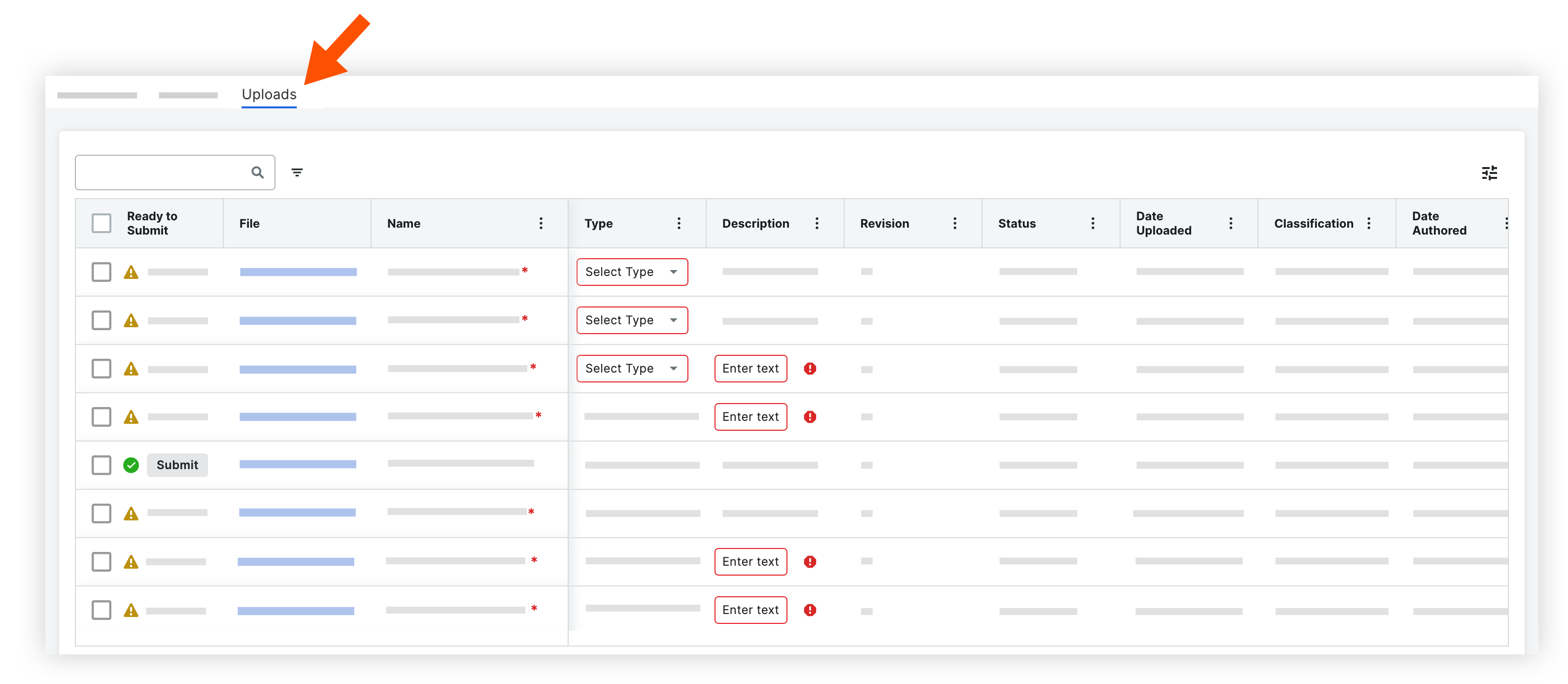
Click the Uploads tab.
-
Find the documents that you want to submit.
-
You can submit one documents or multiple documents at a time:
-
To submit one document, click Submit.
-
To submit multiple documents, mark the checkbox next to each document and click the check icon.
-
To submit all documents that have been completed, mark the checkbox at the top of the table and click the check icon.

-
From the Document Viewer
Tip
If you have just recently uploaded documents and the 'Uploads' window is still open, you can hover over the green check icon for a document and click Review to open it in the viewer.
-
Click the name of the document that you want to open in the viewer.
The document loads and the Information side panel opens. You can also click the information icon to open the panel.
 -
When you're ready to submit the document, click Submit.
The document will be submitted from the Uploads tab, and the viewer will automatically load the next document. You can use the arrows or drop-down menu at the top of the viewer to open a different document. -
If you want to close the viewer and return to all documents, click Close.
undefined
Resolve Workflow Conflicts: If the 'Prevent concurrent workflows' rule is enabled and a previous revision is in an active workflow, a 'Workflow Alert' modal appears.
- Select the new revision you are submitting.
- Enter a Termination Reason and select a Termination Status for the older revision.
- Click Continue, then click Confirm to terminate the old workflow and submit the new revision.