Run an Agent in Assist
Background
Assist is Procore's AI-driven assistant. If you have Procore Agent Builder enabled on a project, you can run the following type of AI Agents in Assist:
- Agents others created and published for the project using Agent Builder.
- Agents you created for the project using Agent Builder.
- This includes a Starter Agent Procore created, if you have made a copy of it first.
Things to Consider
- Required Permissions:
- Any user can create and run an Agent. However, to get the expected results, the user running the agent (via Assist) needs the necessary permissions in all tools involved in the Agent’s tasks. For example, if you lack permission to view an RFI, the Agent will not provide information about that RFI, even if you created the Agent.
- Additional Information:
- To see and use Agents, enable Assist and Agent Builder on the project. See About Agent Builder.
- An Agent must be published by its author in Agent Builder for it to appear for all users in the project's list of Agents in Assist. If an Agent is saved but not published, it is available for use in Assist by the Agent's author only.
- Learn more about what data is available to Agent Builder, such as how Procore AI cannot read markups on drawings or photos
- At this time, Procore AI treats each discussion as a unique encounter and cannot access previous discussions when you start a new chat thread. An Agent can retrieve information it helped you create previously, but it cannot recall information you shared in a previous chat thread if that information did not make it into Procore.
Steps
- From your Procore project, open Assist by clicking the Assist
 icon in the sidebar.
 - Click Use Agent to see a list of the available Agents.

- Click on an Agent from the list, or use the search bar in the side panel to find an Agent that best aligns with your business need. This action does not run the Agent.
- Type a question or request you have that is related to the Agent's area of expertise. Assist will use the agent you selected to find the answer or resources.
- If you request something outside the scope of the selected Agent, it may fail to return results or provide substandard results.
- If you're not sure what the Agent can do, ask it, "What can you do?"
- Click the orange arrow or ENTER on your keyboard.
- If Assist provides a link with your answer, click it to open the support article or a 360 Custom Report presenting the data you requested. This helps you verify the answer you received from Assist and discover additional insights.
- Optional actions:
- Change your Agent by clicking Change Agent and selecting a new one.
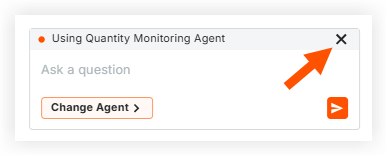
- Remove your Agent (to interact with Assist alone) by clicking the x next to the Agent's name where it's listed inside the text box where you interact with Assist.
- Edit an Agent or build a new one in the Agent Builder tool.
- Select the thumbs-up or thumbs-down icon to provide feedback about each answer you receive from Assist. Feedback is reviewed by our development team and helps improve the Procore AI experience.
