Procore AI
Table of Contents
Overview
Tutorials
FAQ
Release Notes
Below are the notable changes to the Procore AI & Datagrid tool.
Recent Changes
Control Tower Updates in Datagrid (09/25/2026)
Control Tower's navigation and budget-setup screens have a few updates based on customer feedback. The former Reports tab is now called Overview, and the former Budgeting tab is now called Budget. In the Budget tab, you can now pick your daily reset time from a clock instead of typing it in, and the daily and monthly credit limit fields show clearer guidance and error messages when a value is out of range. This is phase 1 of a broader round of Control Tower updates. Learn more about credit monitoring and budgeting.
Introducing Private Space (09/24/2026)
You can now create items (agents, datasets, pages, etc.) in a Private area visible only to you. From there, you can share an item with specific teammates using the Share button, without making it visible to the rest of the team, or move it into your team's shared Teamspace so everyone can see it. Both actions can be reversed, and only the item's owner can move it. This feature is available in Datagrid to all Datagrid and Procore AI plans. Learn more in Manage Your Private and Shared Items in Datagrid.
Stable outbound IPs for Agent Server traffic now available for allowlisting (09/11/2026)
Procore AI and Datagrid agents that connect to external systems now have stable outbound IP addresses for Agent Server traffic, so IT and security teams can allowlist those addresses. These addresses are designed to stay consistent across infrastructure updates to help reduce ongoing firewall maintenance for organizations with restricted network policies. Learn more about allowlisting.
Production outbound IPs:
-
54.174.198.5
-
34.196.65.237
annual credit option for new digital coworker contracts (09/09/2026)
Companies signing a new Pro or Enterprise Digital Coworker contract to add Procore AI can now choose annual credit allocation instead of monthly. Choosing annual means your full yearly credit amount is available at the start of the term rather than an allotment refreshing each month, which helps when project workloads are uneven across the year.
Simplified Chat Controls and a Smarter Default Mode (09/02/2026)
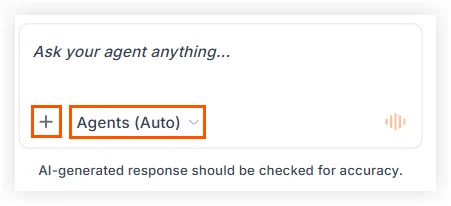
Modifying your AI chat settings in Procore AI and Datagrid is now simpler with consolidated controls. These changes help you optimize results without losing momentum:
-
Streamlined agent selection: Agent selection is now the most prominent option in the chat box, and it’s easier to switch from Auto agent selection to your preferred agent(s).
-
Plus + menu: Add attachments, actions, tools, or switch to a different LLM, by clicking the plus icon. This is also where you manage your agent memories, prompt library, and more. No functionality is removed — these options just live in one place now instead of dispersed across several menus.
We’ve also improved the default mode, Agents (Auto), so that it handles simple questions itself, uses tools as needed — including any you’ve added from the plus + menu — and calls a specialized agent when the work clearly belongs to one. Or, if you name an agent in your message, you stay in Auto mode, and it uses that agent to assist with your task. Instead of having the Ask or Execute toggle, Auto now decides how to handle each request for you. Learn more in Manage Your AI Chat Controls.