Procore

About the Procore Support Dashboard (Beta)

Overview

 In Beta
This feature is currently in closed beta for select Procore customers.

The Support Dashboard is a centralized, in-app portal designed to give users complete visibility into their support request history and ticket statuses directly within the Procore platform. Managing support inquiries across different channels can make it difficult to track open requests and overall ticket progress in one place. The Support Dashboard helps streamline this experience by consolidating support ticket visibility into a single, permission-controlled interface directly within Procore, bringing us closer to a fully unified support experience.

By bringing ticket management directly into the web application, users can monitor active requests, communicate with Procore support representatives, and submit new issues without leaving the active workspace or disrupting daily workflows.

Key Features

Unified Company-Wide & Personal Ticket Management

  • Dual-View Navigation: Toggle seamlessly between All Company Tickets to view organizational support requests across all active projects, or switch to My Tickets for a focused personal queue.
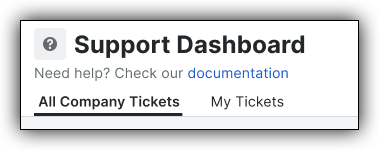
    Support Dashboard interface showing tabs for All Company Tickets and My Tickets with a documentation help link.
  • Comprehensive Multi-Column Filtering: Filter tickets instantly by Tool (e.g., Submittals, Change Orders, Documents), Reporter, Status (e.g., Your Action Required, Under Engineering Review, Received), or Project to quickly pinpoint relevant tickets.
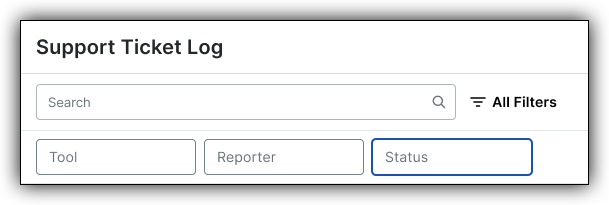
    Support Ticket Log interface with a search bar, All Filters button, and filter options for Tool, Reporter, and Status.

End-to-End Ticket Lifecycle & Activity History

  • Full Resolution Visibility: Open any ticket to access complete descriptions, media attachments, support representative comments, and real-time status updates.

Context-Aware Ticket Submission & Auto-Capture

  • Streamlined In-App Form: Submit new tickets without leaving Procore by selecting the affected tool, entering an issue summary, and attaching supporting documentation or screenshots.

  • Auto-Captured Context: System-level details—including the current Reporter, Company, and Active Project—are automatically attached to every submission to eliminate redundant data entry and accelerate support triage.

  • Internal-Only Context Notes: Include private notes alongside support requests to communicate internal routing rules, technical details, or team context without exposing them to external support agents.

Considerations

Permissions & Prerequisites

  • Required User Permissions:

    • To view and manage company-wide support tickets, 'Admin' level permissions to the Company level Directory tool.
      Note: Access is currently limited to company-level admins; granular user permissions will be introduced in future updates.

Limitations

  • Granular Permissions Pending: Initial rollout relies on Company Admin access; granular role-based permissions will be added later.

  • AI Assistance & Request Logging Integration: Automated AI/Copilot context recommendations and customer-facing request logging integrations are planned post-MVP.

Beta Access & Support

As this is a Closed Beta release, features and functionality are subject to change. Your feedback is critical to final development.

  • How to Access: To enroll in the Beta, reach out to your Procore Point of Contact.

    • To access the Dashboard, click the App Selector icon in the Procore global navigation bar, then select Support Dashboard.

  • How to Provide Feedback: Send your feedback directly to your Procore Point of Contact.

  • Support: Submit a ticket using the new dashboard or use standard Procore Support channels if you experience issues.

Common Questions

Who has visibility into support tickets within the Support Dashboard?

Initially, access is permissioned at the Company Admin level, allowing admins full visibility into both company-wide tickets (All Company Tickets) and their own submitted items (My Tickets). Additional granular permissions (such as Read-Only or Standard user access) will be introduced in future updates.

Will submitting or viewing tickets in this dashboard affect my existing Procore data?

No. The Support Dashboard operates as an integrated viewing layer that links directly with Procore’s support system. It aggregates ticket records without altering or impacting project data, tools, or configurations.

Does the Support Dashboard completely replace standard Procore Support channels?

Not immediately. While this dashboard provides a consolidated in-app workspace for ticket creation and tracking, existing support submission avenues (such as standard support tickets or direct support contacts) remain functional during this phase.

How do status notifications work when a support agent updates my ticket?

Notifications and action items are flagged directly in the Procore global navigation bar under the Support Dashboard icon.

Can external vendor representatives or third parties see my ticket's Internal Notes?

No. The Internal Notes field during ticket submission is strictly designated for internal team context. Information entered here is kept hidden from external support representatives and third parties, ensuring sensitive routing or internal team details remain secure.

Is the Support Dashboard available on the Procore Mobile App?

Currently, the Closed Beta is restricted to the Procore web application. Mobile app integration and responsive web views are planned for subsequent rollout phases.