Retrieve a Budget from ERP Before Acceptance
Objective
To retrieve a budget that was sent to the ERP Integrations tool before it has been accepted by an accounting approver for export to an integrated ERP system.
Background
After a budget is sent to the ERP Integrations tool for acceptance by an accounting approver, the system locks the budget. You will only be able to to modify it in Procore, after:
- The budget was accepted for export to the integrated ERP system by your company's designated accounting approver, and has been synced with the integrated ERP system.
OR - The budget was rejected by the accounting approver.
However, if you recently sent a budget to the ERP Integrations tool and realize you need to quickly correct some data, you can use the steps below to retrieve the budget from the ERP Integrations tool. You can only perform these retrieval steps if the accounting approver has not yet approved the budget for export.
Things to Consider
- Required User Permission:
- 'Admin' permission on the project's Budget tool.
OR - 'Read Only' or 'Standard' permission on the project's Budget tool with the 'Send and Retrieve Budgets from ERP' granular permission enabled on your permission template.
- 'Admin' permission on the project's Budget tool.
- Additional Information:
- You can only retrieve a budget that was sent to the company's ERP Integrations tool if it has not yet be accepted or rejected by an accounting approver.
- If you successfully retrieve a budget from the ERP Integrations tool, you will be able to unlock the budget, make edits, and resubmit the budget.
- Additional limitations, requirements, or considerations might apply depending on the ERP system your company is integrated with. See Things to Know about your ERP Integration for details.
Steps
- Navigate to the project's Budgets tool.
- Click Retrieve from ERP.
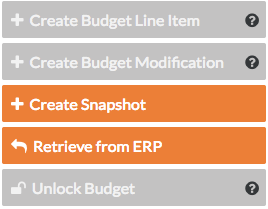
- Click Unlock Budget.
Note: You cannot unlock a budget if there is a budget modification. See Create a Budget Modification.