Prime Contracts - Reuse
Reuse
Callouts
Release Callout - Owner Invoicing Experience
Release Callout - Legacy Owner Invoicing Experience
Owners/SC Dictionary - US English Only
Limited Release
 If you are a Procore customer in the United States, the name of this tool depends on a dictionary setting in your company's Procore account:
- The Prime Contracts tool is Procore's default tool name for the English (United States) dictionary.
- The Funding tool is only available with the Owners point-of-view dictionary.
- The Client Contracts tool is only available with the Specialty Contractors dictionary is active.
To learn about the dictionaries and required Project level and User level dictionary settings, see What tool names and terms are different in Procore for general contractors, owners, and specialty contractors?
Beta - Modernized Experience for Prime Contracts
In Beta
This content is for participants in the Project Financials: Modernized Experience for Prime Contracts beta program.Beta - New Design Contracts Table
In Beta - EARLY ACcESS DESIGN
This content is for participants in the Project Financials: New Contracts List in Commitments & Prime Contracts early access design release.
COMING SOon - Budget Code in Financial Markup
Coming Soon
In the future, Procore will add a 'Budget Code' drop-down list in the 'Maps To' section of the 'Add Horizontal Markup' and 'Add Vertical Markup' windows.Note: Budgeted Production Quantities and PCCOs
Notes
- For customers using Procore's Resource Tracking and Project Financials tools, production quantities and hours entered on your project's change orders automatically updates data in these Procore features, when change orders are placed in the 'Approved' status:
- The Procore Labor Productivity Cost budget view. See Set Up the Procore Labor Productivity Cost Budget View.
- The Field Production Report. See Set Up a Field Production Report.
- To learn about the data columns in this report, see Which data columns are in a Field Production Report?
- To learn about the Procore tools that interact with this report, see Which Procore project tools update data in the Field Production Report?
Note: Custom Numbering Scheme On Change Orders
Notes
- Procore automatically assigns the item a new number in sequential order. For example; 001, 002, 003, and so on.
- To use a custom numbering scheme, enter any set of alphanumeric characters. Procore automatically assigns new numbers in sequential order using your custom scheme.
Note: Revised Substantial Completion Date Setting Enabled
Note
If the substantial completion date is enabled on the 'Configure Settings' page of the tool, Procore updates the change order's 'Revised Substantial Completion Date' field after the change order is placed into the Approved status.Tip: Designated Reviewer on Change Orders
Tip
Are you the 'Designated Reviewer' on a change order? To learn how to submit an approve or reject response, see Approve or Reject a Change Order.
Content
Prime Contracts
Owner Invoices
Open an Invoice (Invoicing)
To open an owner invoice in the Project level Invoicing tool:
- Navigate to the project's Invoicing tool.
- Click the Owners tab.
- In the table, locate the invoice to edit.
Tips
- Looking for a specific invoice? To quickly find a match in a long list of invoices, start typing in the Search box. Procore narrows the list to show only the invoices that match your keywords.
- Want to organize the invoices in the Owner list? To organize the invoice table, use the options in the Add Group and Add Filter menus. To learn more, see Search, Filter, and Group Invoices.
- Click the Invoice No. link.
Procore opens the invoice. You have different editing options on each card in the invoice.
Open an Invoice (Prime Contracts)
To open an owner invoice in the Project level Prime Contracts tool:
- Navigate to the project's Prime Contracts tool.
- In the table, locate the invoice to edit.
Tips
- Looking for a specific invoice? To quickly find a match in a long list of invoices, start typing in the Search box. Procore narrows the list to show only the invoices that match your keywords.
- Want to organize the invoices in the Owner list? To organize the invoice table, use the options in the Add Group and Add Filter menus. To learn more, see Search, Filter, and Group Invoices.
- Click the Number link.
Procore opens the invoice. You have different editing options on each card in the invoice.
Open an Invoice (Progress Billings)
Limited Release
The Progress Billings tool is only available to Procore customers in the United States who have implemented the Procore for Specialty Contractors point-of-view dictionary. To learn more, see (Limited Release) Owners & Specialty Contractors Point-of-View Dictionary Options. To open an owner invoice in the Project level Invoicing tool:
- Navigate to the project's Progress Billings tool.
- In the table, locate the invoice to edit.
Tips
- Looking for a specific invoice? To quickly find a match in a long list of invoices, start typing in the Search box. Procore narrows the list to show only the invoices that match your keywords.
- Want to organize the invoices in the Owner list? To organize the invoice table, use the options in the Add Group and Add Filter menus. To learn more, see Search, Filter, and Group Invoices.
- Click the Number link.
Procore opens the invoice. You have different editing options on each card in the invoice.
Summary Preview
Example
The Summary Preview lets you view the finished layout of your owner invoice.
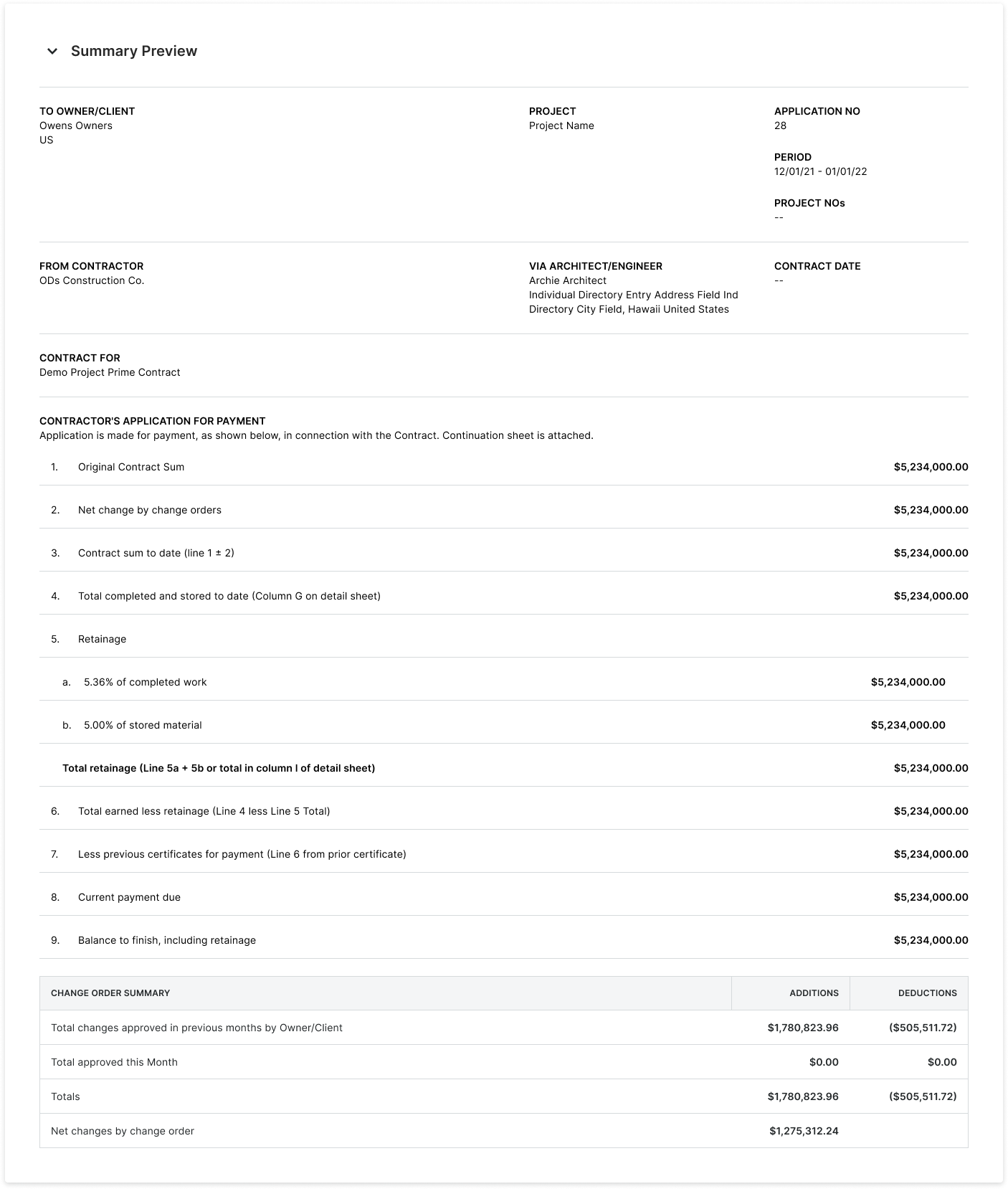
Summary Preview - General Information
The table below details each field in the General Information area of an owner invoice.
| Field | Description | Project Tool | Source Field(s) |
|---|---|---|---|
| To Owner/Client | Shows the name of the Owner/Client as specified in the contract. | Directory, Prime Contracts, Client Contracts, or Funding | Owner/Client |
| Project | Shows the name of the project as specified in the Project Number field in the Project Information area of the Project Details page. | Portfolio | Project Number |
| Application No. | Shows the invoice number specified on the invoice. | Prime Contracts, Invoicing, Progress Billings | Invoice No. |
| Period | Shows the billing period for the invoice. | Invoicing | Billing Period |
| Project Nos. | |||
| From Contractor | Shows the name of the primary contractor managing the project | Prime Contracts, Client Contracts, or Funding | Contractor |
| Via Architect/Engineer | Shows the name of the Architect/Engineer as specified on the contract. | Prime Contracts, Client Contracts, or Funding | Architect/Engineer |
| Contract Date | Shows the effective date of the contract. This is the date the contract went into force. | Prime Contracts, Client Contracts, or Funding | |
| Contract For | Shows the name of the project as specified in the Project Number field in the Project Information area of the Project Details page. | Prime Contracts |
Summary Preview - Contractor's Application for Payment
The table below provides details about each field in the Contractor's Application for Payment area of an owner invoice.
| Line | Field | Description | Project Tool | Source Field(s) |
|---|---|---|---|---|
| 1 | Original Contract Sum | Show the amount recorded in the 'Original Contract Amount' field in the contract. | Prime Contracts, Client Contracts, Funding | Original Contract Amount |
| 2 | Net Change by Change Orders | Shows the total amount of any change orders in the Approved status that impact this invoice. | Prime Contracts, Client Contracts, Funding, Change Orders | |
| 3 | Contract Sum to Date (Line 1 ± 2) | Shows the sum or difference of the Original Contract Sum (line 1) combined with the Net Change by Change Orders amount (line 2). This shows the positive or negative cost resulting from any approved change orders. See the Summary Preview - Change Order Summary. | Prime Contracts, Client Contracts, Funding, Change Orders | |
| 4 | Total Completed and Stored to Date (Column G on Detail Sheet) | Procore adds the Work Completed values + Materials Presently Stored Shows the cumulative sum of the cost for each line item on the invoice. This represents the work | Invoicing | |
| 5 | Retainage | Shows the percentage of the payment is being withheld until the job is complete. This value is specified in the contract. Typically, the value is between 5% and 10% for each progress payment. Because some regions require variable retention, the 'Retainage' amount may only be reduced once a certain percentage of the contract is complete. |
Prime Contracts, Client Contracts, Funding | |
| 5a | % of Completed Work | Shows the percentage of work completed from previous payment applications plus the work completed for this billing period. | Prime Contracts, Client Contracts, Funding, Invoicing, Progress Billing | |
| 5b | % of Stored Materials | Shows the percentage of materials being stored on-site. This reflects the value of the materials that were purchased for, but not used on, the project up to the end of the invoice's billing period. | Prime Contracts, Client Contracts, Funding, Invoicing, Progress Billing | |
| - | Total Retainage (Line 5a + 5b or Total in Column I on Detail Sheet) | Shows the variable retainage rate. A variable retainage rate can represent one of two rates: (1) The amount of retainage that is reduced after a certain percentage of work is complete, or (2) the amount of retainage that retainage applies only to labor and NOT to materials. Note: If you are withholding a fixed percentage throughout the entire project, you will not use this field. |
||
| 6 | Total Earned Less Retainage (Line 4 less Line 5 Total) | Shows the Work Completed and Materials Stored Amount | ||
| 7 | Less Previous Certifications for Payment (Line 6 from Prior Certificate) | Shows all previous payments for the contract. On the first invoice, this number is zero (0). On subsequent invoices, the amount matches line 6 on the previous invoice. | Invoicing | Total Earned Less Retainage (from previous invoice) |
| 8 | Current Payment Due | Shows the current payment due for the invoice's billing period. This calculation takes the 'Total Completed and Stored to Date' value in the invoice minus 'Retainage' and any completed payments from past invoices. | Invoicing | Calculated |
| 9 | Balance to Finish, Including Retainage | Shows the amount remaining to be paid on the contract, including the 'Retainage' amount. | Invoicing | Calculated |
Summary Preview - Change Order Summary
The table below provides details about each field in the Change Order Summary area of an owner invoice.
| Field | Description | Project Tool | Source Field(s) |
|---|---|---|---|
| Total Changes Approved in Previous Months by Owner/Client | Shows the total amount of any change orders that were Approved during previous billing periods. | Prime Contracts, Client Contracts, Funding, Change Orders, Invoicing, Progress Billings | Calculated |
| Total Approved this Month | Shows the total amount of any change orders that were Approved during the current billing period. | Prime Contracts, Client Contracts, Funding, Change Orders, Invoicing, Progress Billings | Calculated |
| Totals | Shows the total amount of all Approved change orders. | Invoicing | Calculated |
| Net Changes by Change Order | Shows the net change to the total amount for this invoice. | Prime Contracts, Client Contracts, Funding, Change Orders | Calculated |
Bulk Editing SOV Line Items
To edit SOV line items in bulk:
- Click Edit in the top right corner of the SOV card.
This places the SOV into editing mode. - Place checkmarks in the boxes to the left of each line item. You have these options:
- To select all of the SOV line items, mark the box in the Item Number column (see 1).
- To select all of the line items in a group, mark the box in a line item group (see 2).
- To select individual line items, mark the desired boxes next to each line item (see 3).
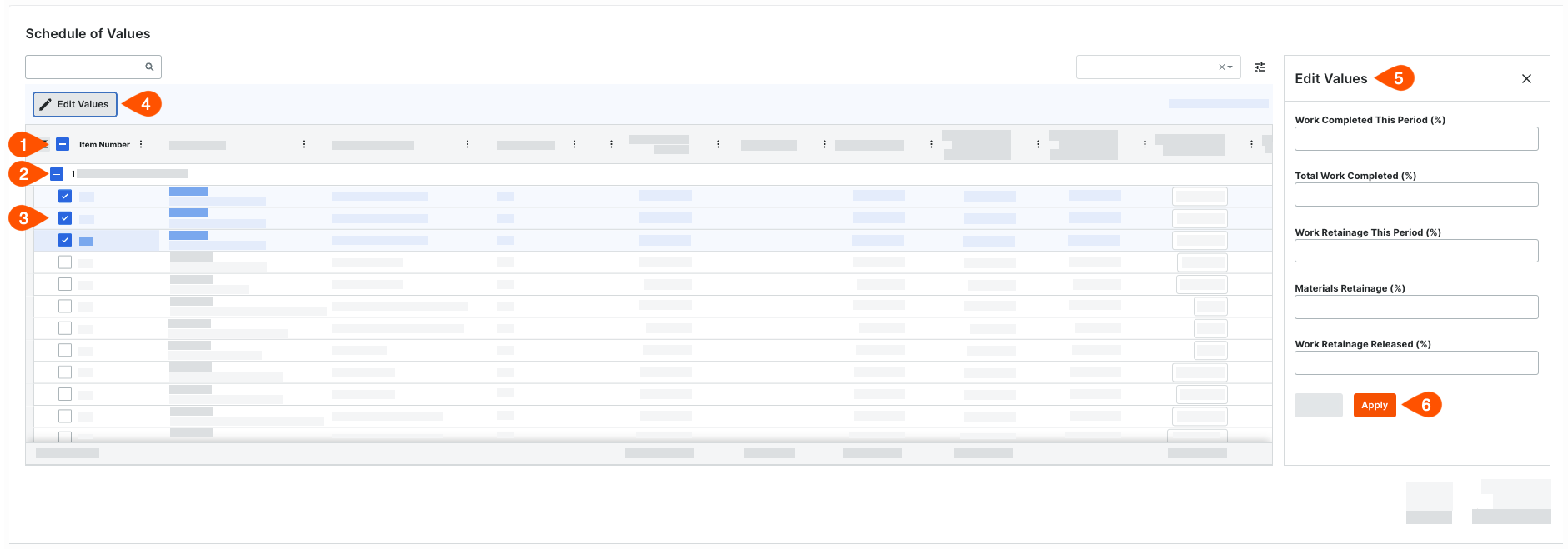
- Click the Edit Values button (see 4).
- In the Edit Values pane on the right (see 5), enter percentage values as needed.
The data entry fields in the Edit Value pane on the invoice's SOV are different, depending on whether the contract was configured to use the amount-based or unit-based accounting method. To learn more, see How do I set the accounting method for a contract? - Click Apply (see 6).
Inline Editing SOV LIne Items
Edit line items inline by typing in the text boxes that appear in the editable cells.

Amount-Based Schedule of Values
To update the line items on an owner invoice's Schedule of Values (SOV) when the prime contract is using the Amount-Based accounting method:
- Scroll to the Schedule of Values.
Each line item on an owner invoice's SOV corresponds to a contract line item. - Click Edit.
This places the Schedule of Values into edit mode. - Enter values in these fields as needed:
The columns in your SOV may be different. To show and hide columns, click the Table Settings icon. To learn more, see Manage Table Settings.
- Work Completed This Period (%)
Enter a percentage to represent the monetary value of work completed for this billing period.
Note: If the user who created the invoice marked the 'Populate the Schedule of Values with Costs from the Selected Billing Period' checkbox, Procore automatically populates the entry in the hidden 'Work Completed This Period ($)' column with values from subcontractor invoices, direct costs, and commitment change orders. - Total Work Completed (%)
Enter a percentage to represent the work completed to date through this billing period. Procore uses this entry to display the '% of Completed Work' (line 5a) in the Summary Preview.
Note: This number represents the cumulative amount of work completed from the first invoice on the contract through the current billing period for this invoice. - Work Retainage This Period (%)
Enter a percentage to represent the work retainage to release this billing period.
Note: An entry in this cell lets Procore automatically calculate the currency value in the 'Work Retainage This Period ($)' column of the Schedule of Values. - Materials Retainage (%)
Enter a percentage to represent the material retainage for this billing period.
Note: An entry in this cell lets Procore automatically calculate the currency value in the 'Materials Retainage This Period ($)' column. - Work Retainage Released (%)
Enter a percentage to represent the material retainage that you are requesting to be released for work completed this billing period.
- Work Completed This Period (%)
Unit/Quantity-Based Schedule of Values
To update the line items on an owner invoice's Schedule of Values when the prime contract is using the Unit/Quantity Based accounting method:
- Scroll to the Schedule of Values.
Each line item in the invoice's Schedule of Values corresponds to a line item on the invoice's prime contract. - Click Edit.
This places the Schedule of Values into edit mode. - Enter values in these cells as needed:
- Work Completed: This Period (Qty).
Enter a quantity amount to represent the work completed for this billing period. This automatically updates the amount in the 'Work Completed: This Period (%)' cell. - Work Completed: This Period (%).
This cell updates automatically when you enter a value in the 'Work Completed: This Period (Qty)' cell. You can type over this value to change the other entries for this row. - Total Completed & Stored To Date: Total to Date (%).
This updates automatically when you enter a value in the 'Work Completed: This Period (Qty)' or 'Work Completed: This Period (%)' cells. You can type over this value to change the other entries for this row.
- Work Completed: This Period (Qty).