Sync Job Cost Transactions from an Integrated ERP into Procore
Objective
To import the job cost transactions created in your ERP so you can view ERP direct costs detail in a Procore budget.
Background
If your Procore company account is integrated with your ERP, you now have the ability to import job cost transaction data from your ERP into Procore. Once imported, the values of those transactions can be viewed in the 'Direct Costs' column on a budget line item. In addition, users who are assigned the appropriate granular permission can also click the values in the 'Direct Costs' column in the budget tool to open a window showing detailed information about the item.
This feature provides users of a supported integration with the following features and benefits:
- Add a 'Direct Costs' source column to your Procore project's budget view
Provides authorized users with the ability to add a 'Direct Costs' column to your project's budget view. - Track ERP direct costs in a Procore budget
Once the 'Direct Costs' column has been added to a budget view, project users with access permissions to the budget can view the lump-sum totals from the ERP job cost transactions as a direct cost value on a budget line item. The value in this column shows your project's 'Direct Costs' total for all items in the 'Pending', 'Revise and Resubmit', and 'Approved' status. Note: An accounting approver can sync the job cost transaction details from the ERP on the Job Costs tab of the ERP Integrations tool. - View direct cost transaction detail on a budget line item
Project users with the 'View Direct Cost Details' granular permission enabled on their permission template can click the hyperlink in the Direct Costs column of a budget line item to open the direct cost's details in a popup window. This granular permission is located in the 'Budget' section when configuring a permission template. - Choose which direct costs appear in your budget view
Provides authorized users with the ability to show or hide certain types of direct costs. Procore imports direct costs from your ERP with types of subcontractor invoice (for payables against commitments), invoice (for non-commitment payables) and expense (for journal entries).
Things to Consider
- Required User Permissions:
- 'Admin' permissions on the ERP Integrations tool.
- Requirements:
The steps for enabling this feature are as follows:- Your Procore Administrator (or a user with 'Admin' permission on the project's Admin tool) must enable the job cost transactions syncing capability. See Enable ERP Job Cost Transaction Syncing on a Procore Project.
- Your Procore Administrator must update your project's budget view(s) to complete these steps:
- If you have previously completed the steps described in Add the 'ERP Direct Costs' Column to a Procore Budget View for ERP Integrations, you will need to remove both the existing 'ERP Direct Costs' calculated column and the 'ERP Job to Date Costs' source column.
- After removing these columns, you will need to add the recommended columns for job cost transaction syncing to your budget view(s). For instructions, see Add Columns to a Budget View for ERP Job Cost Transaction Detail.
- Requirements, considerations, and limitations might vary depending on the ERP system your company is integrated with. See Things to Know about your ERP Integration for details.
Steps
- Navigate to the company's ERP Integrations tool.
- Click the Job Costs tab.
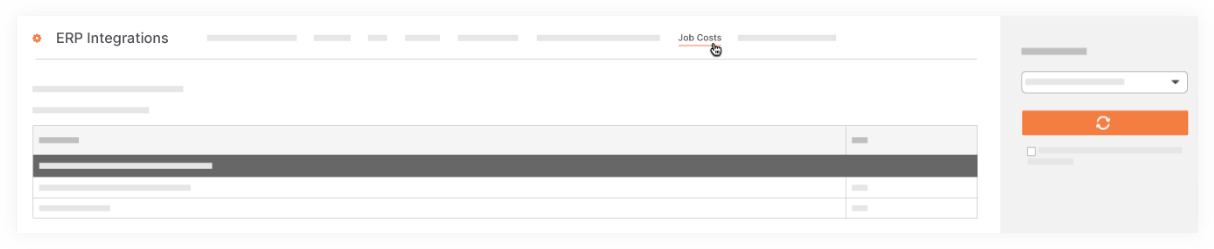
- Select the relevant project from the Select a Job drop-down menu.
- Click Sync Job Costs for Selected Job.