T&M Tickets: Signature Requests
This announcement represents a single point in time. Future releases may impact the information below.
Feature Released: December 7, 2020
T&M Tickets: Signature Requests
Procore has updated the T&M Tickets tool so you can now request a customer signature. This gives your customer signee's more flexibility when verifying T&M Tickets and also removes the need to interact in person. When you create a T&M ticket, you can instantly send your customer signee a signature request by email. Signees also have the ability to draw their signature from their desk using either the Procore web application or from the convenience of the field using Procore for Mobile (Android & iOS).
Why is this important?
This update includes the following benefits:
- Spend time working, not waiting to collect signatures. Instead of wasting valuable work time tracking down or waiting for a Superintendent to sign off on tickets, you can create a T&M ticket and immediately send an electronic signature request from either the Procore web application or a Procore for Mobile (Android and iOS) app. It also provides your customers with the ability to review tickets on their mobile device in the field or from their computer in the trailer.
- Instantly notify signees about T&M Tickets needing signatures. When you initiate a signature request, Procore immediately sends the signee a 'Signature Requested' email and capture the date and time in your change history—reducing any worries about lost or delayed paper tickets.
- Safely capture customer signatures from the web or mobile app. Customers can also enjoy the same flexibility by signing off on tickets from any device and peace-of-mind by removing the requirement to interact in person.
What features are included?
This update to the T&M Tickets tool includes features for these Procore products:
Procore Web Application
This update includes the following improvements to the 'Approvals' section of the T&M Tickets tool:
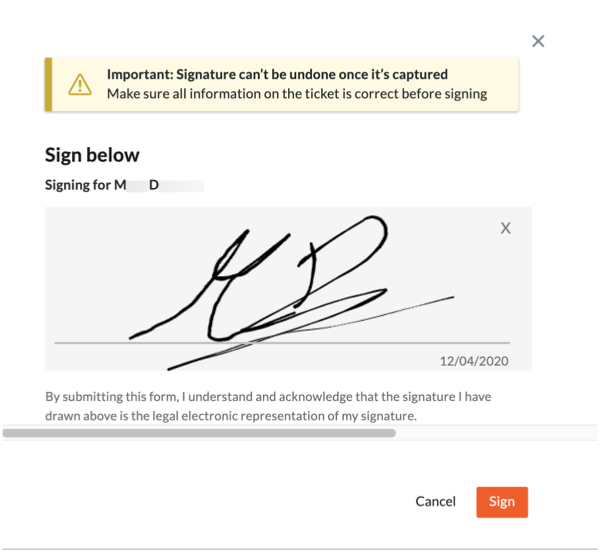
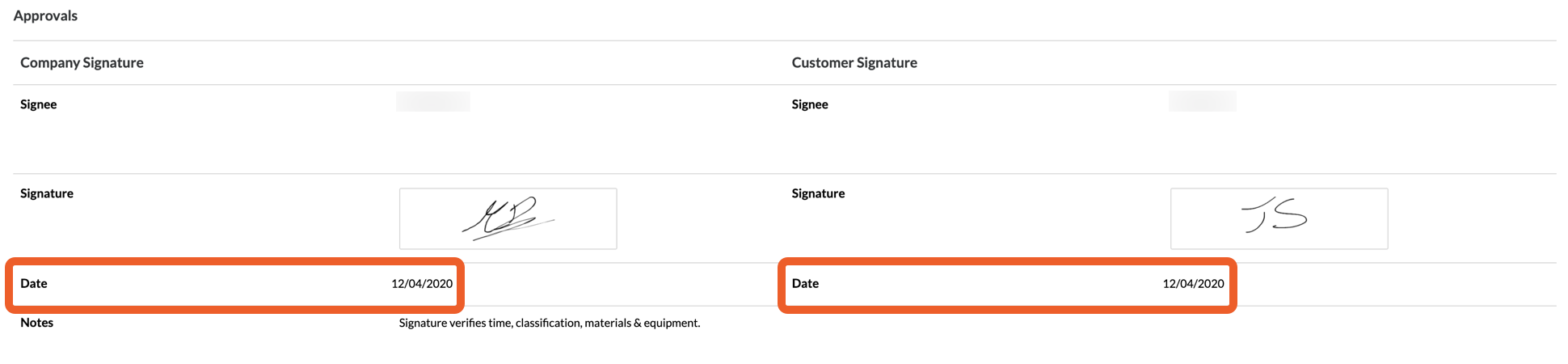
- New 'Provide Signature' Link for Specialty Contractors. Added a new 'Provide Signature' option which opens a 'Sign Below' pop-up window to draw a digital signature using your computer's touchpad/trackpad. After clicking 'Sign' the pop-up window closes and the T&M Ticket shows an image in the 'Signature' field. Procore also shows when you saved your signature in the 'Date' box.

- New Request Signature Button for Specialty Contractors. Added a new button to the 'Approvals' section of a T&M ticket, simply click the button to send a 'Signature Requested' email to your customer's designated 'Signee.'

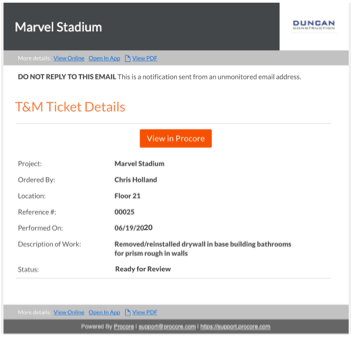
- Signature Requested Email for Customers. A new email message with the subject line "Signature Requested" is delivered to your customer's email Inbox, to notify that person that their signature is being requested on a T&M Ticket. The user can now click the 'View in Procore' button to open the T&M Ticket.
- New Send Reminder button for Specialty Contractors. After you send a signature request, Procore shows the date and time it was sent. A 'Send Reminder' button also lets you send follow-up reminders about the signature request to your customer's email Inbox. Simply click the button and acknowledge a confirmation message that appears to send a reminder.

- New Provide Signature Option for Customers. For the designated 'Signee', you can now click a new 'Provide Signature' option which opens a 'Sign Below' pop-up window to draw a digital signature using your computer's touchpad/trackpad. After clicking 'Sign' the pop-up window closes and the T&M Ticket displays an image in the 'Signature' field. Procore also shows when you saved your signature in the 'Date' box.
Important
- A signature cannot be undone once it's been sent. Always make sure the information associated with the T&M Ticket that you are approving is correct before completing your signature.
Procore for Mobile (Android & iOS)
- Send a signature request and reminders to your company and customer signees. Similar to the web application, you can now send a request for signature directly to your company and custom signeee with a tap of a button Procore for Android and Procore for iOS. For details, see Request a Signature on a T&M Ticket (Android) and Request a Signature on a T&M Ticket (iOS). After the initial request is sent, you can tap the button again to send reminders.
- Capture signatures from company and customer signees. Signees can draw a digital signature using their mobile device's touchscreen and submit their signatures by tapping the Sign button. See Sign a T&M Ticket (Android) and Sign a T&M Ticket (iOS).
- Receive confirmation alerts about signatures. Once signees review their ticket, draw their signature, and then tap Save, you'll receive an automatic confirmation message with the subject line "T&M Ticket Verified."
See Also
If you would like to ask questions or share any feedback, please contact support@procore.com.